Dieline Generators for Packaging: What a Printer Actually Needs
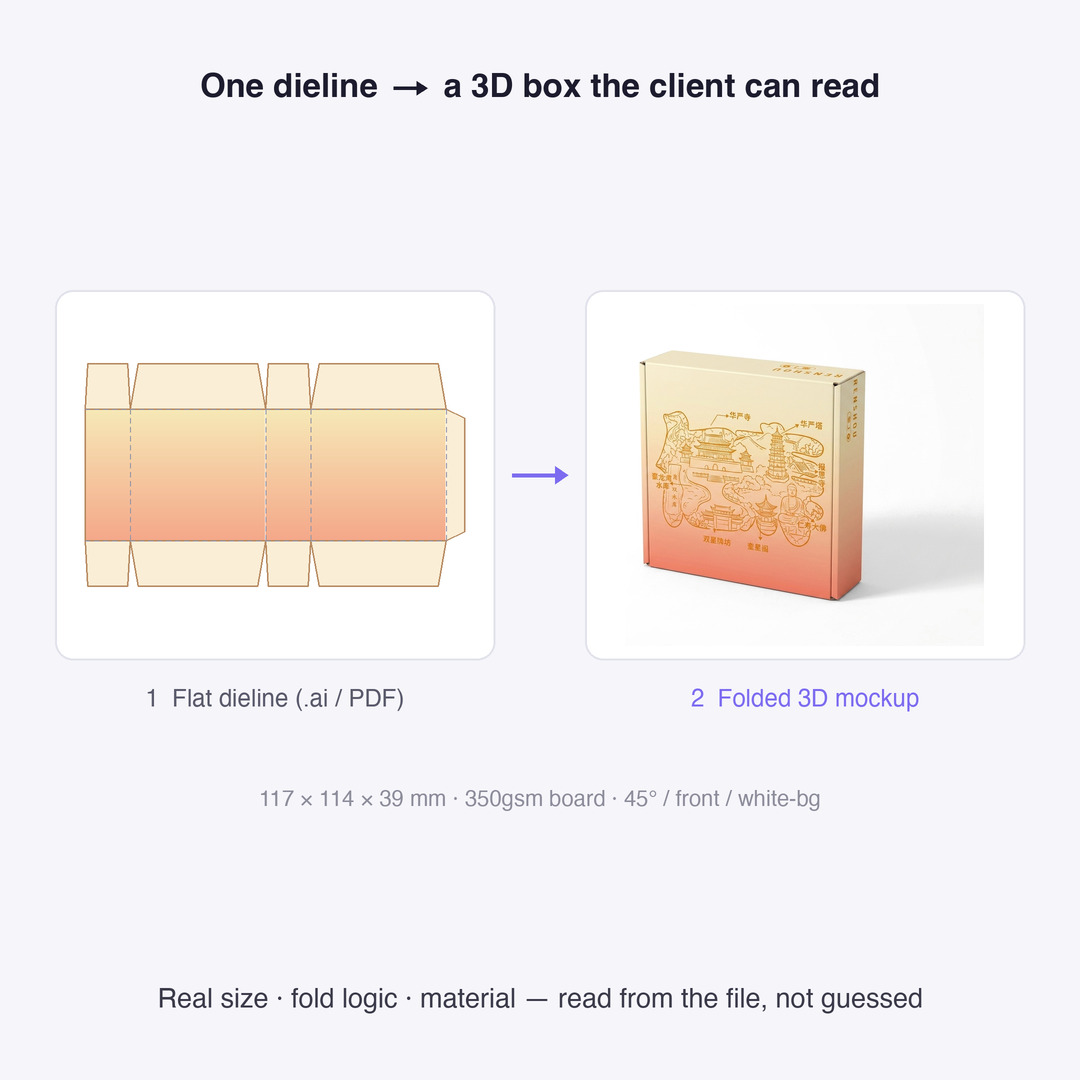
A printer will not quote from a mockup. It quotes from a dieline: a flat cutting plan with real millimetres on it. Here is what that file has to contain, and the one mistake that makes an AI-generated box unusable.
What a dieline actually is
A dieline is not a picture of a box. It is the flat cutting plan a die maker turns into a physical steel-rule die, and every line on it means a different machine operation.
| Line type | What it tells the factory | Printed on the box? |
|---|---|---|
| Cut line | Where the steel rule cuts through the board | No |
| Crease / fold line | Where the board is scored so it folds without cracking the fibres | No |
| Bleed | Artwork extended past the cut, typically 3 mm, so a slight misregistration never leaves a white edge | Trimmed away |
| Safe area | The inset — again typically 3 mm — inside which all text and logos must sit | Yes |
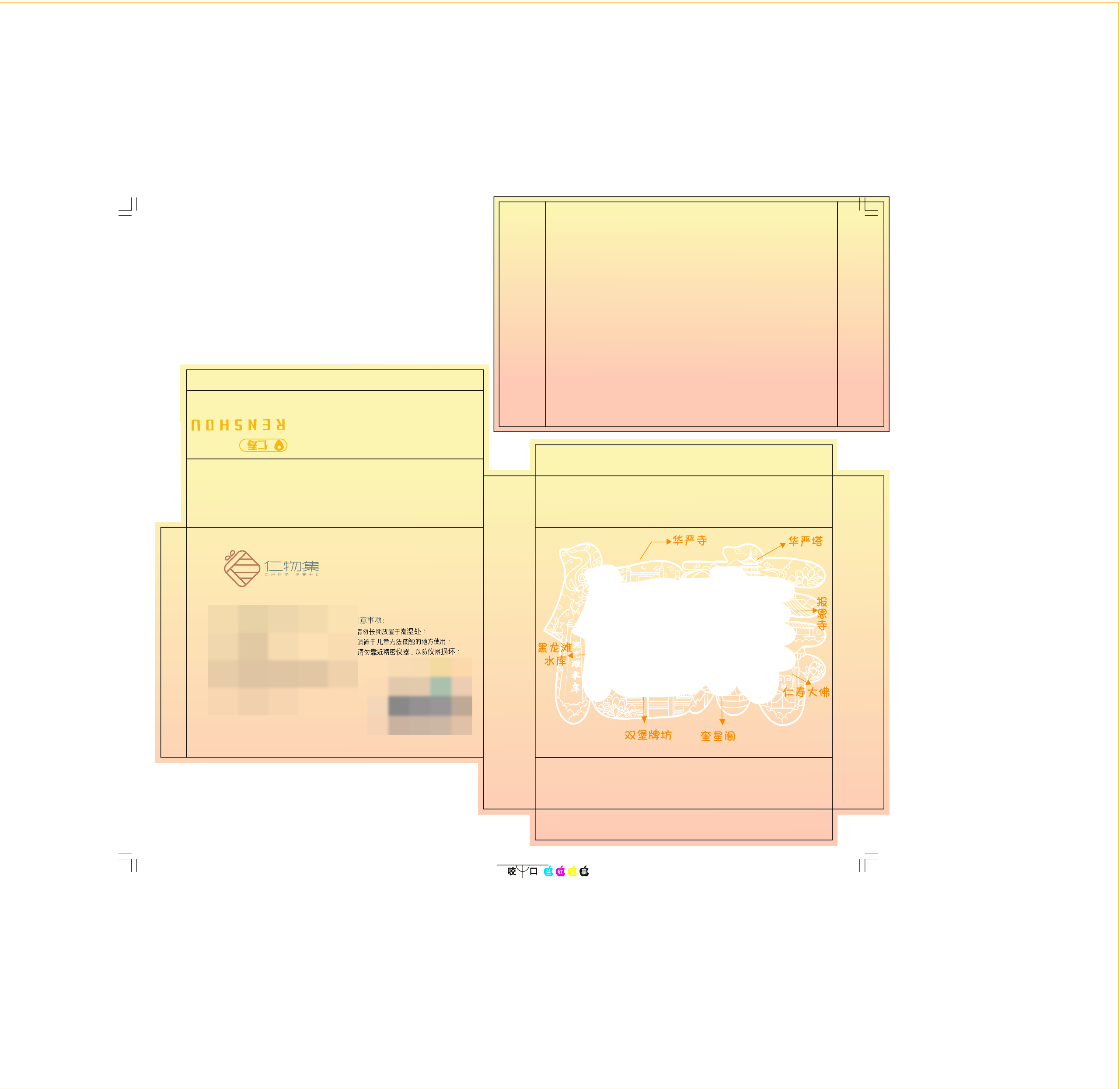
The dieline above is a real commissioned box; the commissioning block and barcode are masked. It is 117 × 114 × 39 mm on 350 gsm board. Those numbers are not decoration — they are what the quote is built from, and they are the reason a dieline outranks any render in the production conversation.
Why the printer rejects the file
Four rejections account for most of the back-and-forth, and none of them are about how the design looks:
1. No cut line on its own layer. The die maker needs the cut path isolated — usually as a named spot colour such as CutContour — not baked into the artwork. A cut line drawn as a black stroke inside the design is invisible to their workflow.
2. Text sitting in the bleed. Anything outside the safe area is a gamble on trim tolerance. Cutting drifts by a millimetre or two across a run; a logo 1 mm from the edge will be clipped on part of the batch.
3. RGB artwork. Presses print CMYK. Sending RGB means someone else converts it, and that conversion is where colour silently shifts.
4. A flattened file with no structure. One merged raster gives the factory nothing to separate — no cut path, no fold lines, no white-ink plate.
The proportion trap: read W×H×D from the dieline, never let the model guess
This is the single biggest failure in AI packaging mockups, and it is worth seeing rather than describing.
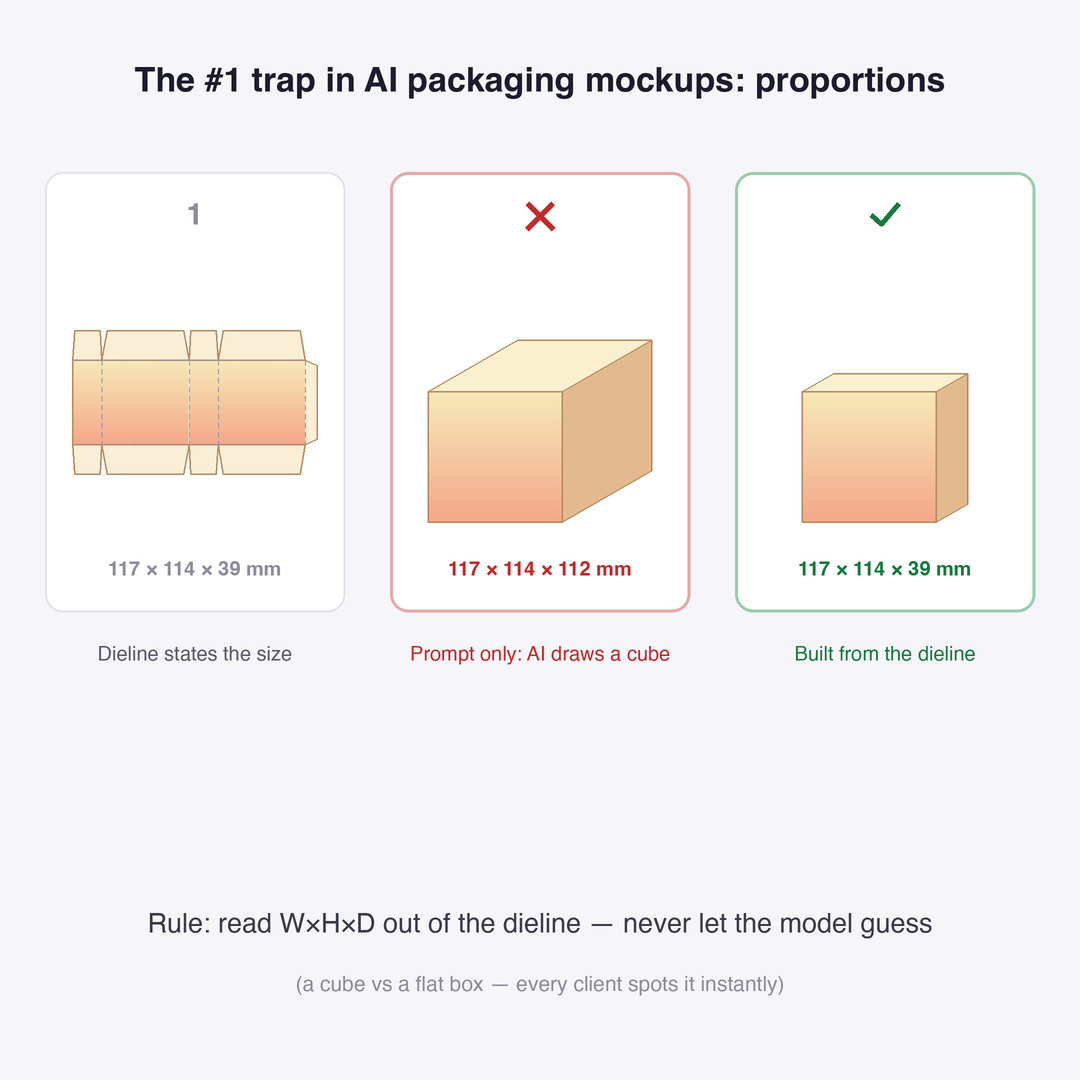
Ask an image model for “a folded box mockup of this design” and it will produce a box whose proportions merely look plausible. In our own test the model drew roughly 117 × 114 × 112 mm — near enough a cube — against the dieline's actual 117 × 114 × 39 mm. The depth was out by close to 3×.
That error is fatal in a client conversation for a reason that has nothing to do with rendering quality: a flat box and a cube are different products. Anyone who has handled the real thing spots it in a second, and the mockup stops being evidence and becomes a liability.
The rule: read W×H×D out of the dieline and pass it to the mockup step as a constraint. The geometry is already stated in the file. Any pipeline that re-derives it from a text prompt is throwing away the one authoritative number it had.
From dieline to a proof the client can read
A dieline is unreadable to most clients — it is a flat sheet of panels and tick marks. A 3D proof built from that dieline is readable by everyone and still carries the real dimensions.
Both artefacts are needed and they serve different audiences:
- The dieline goes to the factory. It is what gets quoted and what drives the die.
- The 3D proof goes to the client for sign-off, and to the listing photography brief.
Because the proof is generated from the dieline rather than from a prompt, the two never drift apart. Sign-off happens on the same geometry the factory will cut.
What AI still gets wrong
Being specific about the limits is more useful than another feature list:
- Colour shift on conversion. Straight RGB→CMYK dulls bright, saturated colours; the fix is a modest saturation lift plus the printer's own ICC profile. Worth knowing that the effect is uneven — vivid colours move a lot, muted browns and greys barely shift — so a test on a brown subject will wrongly suggest there is no problem.
- White ink. Anything printed on clear or metallic substrate needs a separate white plate under the artwork. That is a distinct file, not an effect, and models do not produce it.
- Cut tolerance. A cut path that hugs the artwork looks tight on screen and produces visible slivers of backing at production tolerance.
- Structure, not just surface. A model can restyle a panel beautifully and still know nothing about board thickness, grain direction, or whether a fold will crack.
The honest summary: AI is good at the surface and bad at the structure. Use it to generate and adapt artwork, and use the dieline as the source of truth for everything dimensional.
Tools for each step
- Packaging mockup generator — folds a dieline into a 3D box proof at the dimensions stated in the file rather than dimensions inferred from a prompt.
- Die-cut sticker file — produces the cut path as a separate layer alongside the artwork.
- Acrylic factory export — emits the multi-file set an acrylic factory expects, including the mirrored back and the white-ink plate.
Related collections: packaging templates · sticker templates
What Curify emits
For a die-cut or acrylic job the output is a file set, not an image: front artwork, the mirrored back, a white-ink plate, the cut path as its own vector layer, a flattened preview for sign-off, and a spec sheet carrying the dimensions and material.
That structure is the whole point. A factory does not want a beautiful PNG — it wants separable plates and one unambiguous number for every dimension. The design work and the production work are different jobs, and the handoff between them is a file format problem more than a creative one.
Conclusion
A dieline is the contract between a design and a machine. Everything that makes packaging expensive to fix — wrong depth, clipped text, washed-out colour, a missing white plate — is settled in that file before anyone prints anything.
Generate the artwork with AI. Take the geometry from the dieline. The moment a model is allowed to guess a dimension that the file already states, the proof stops being evidence.
One image is a sample. A product line needs the whole set.
Every Curify template runs in bulk. Send the list — SKUs, words, characters, teams, scenes — and we return the full set generated against one locked visual direction, so the line reads as a collection instead of forty unrelated images.
- Works on any template, not a special few — the same prompt structure applied across your whole list.
- One locked visual direction across the set, so a 40-design line stays on-brand end to end.
- Production-ready output where the format calls for it — die-cut paths, dielines, print resolution.
Take the next step
Putting what you read into practice.
Related Articles
merch-pod
Character Turnaround Sheets for Manufacturing: What a Factory Actually Needs
AI Packaging Design: From Brief to Mockup Set in 30 Minutes