Character Turnaround Sheets for Manufacturing: What a Factory Actually Needs
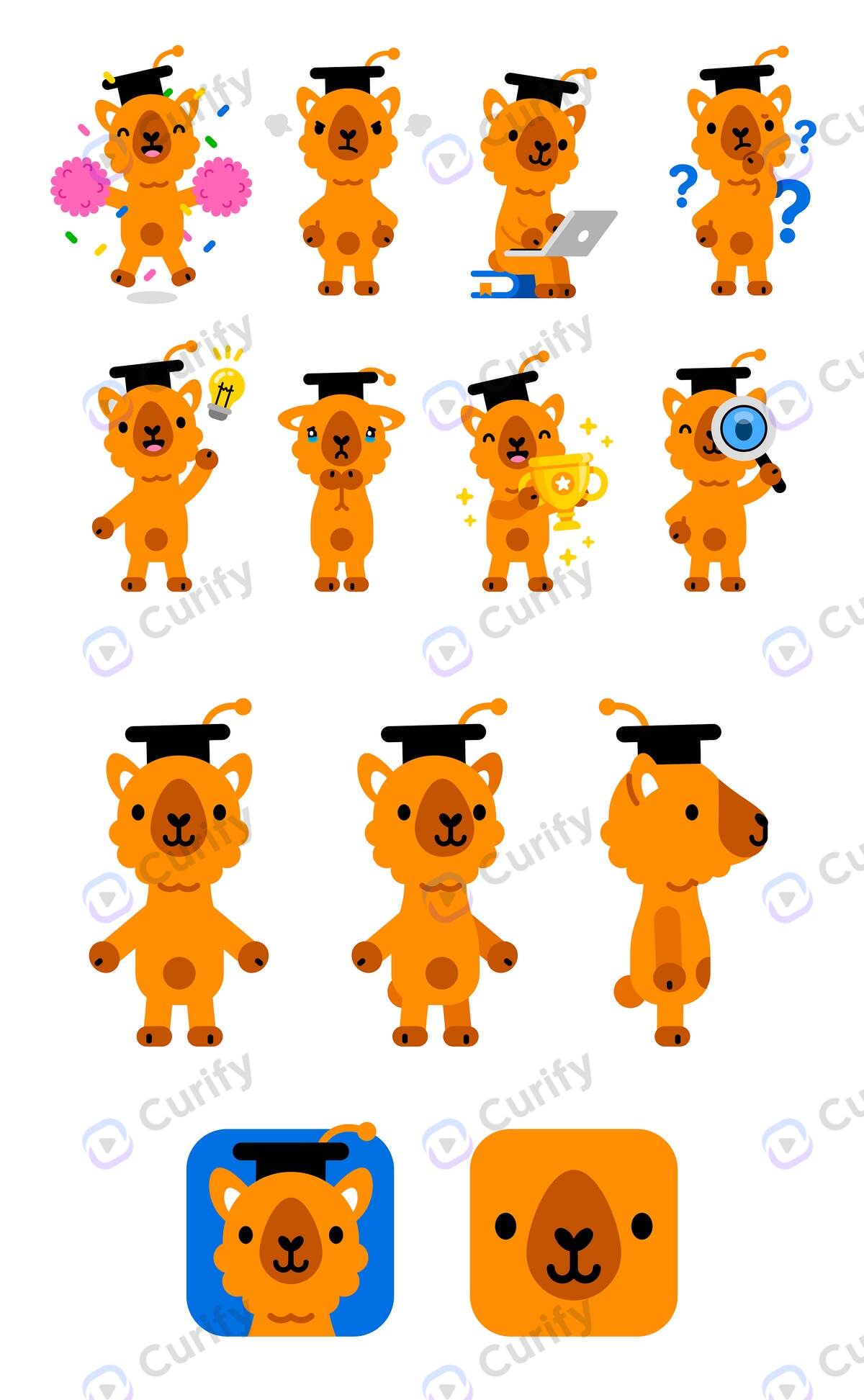
We spent a day in a Dongguan metal-craft factory asking a deliberately boring question: what do you actually need from us to quote a piece? The answer for figurines stopped us.
What a manufacturable turnaround sheet contains
For stickers and acrylic, the answer is files — cut line, white ink, bleed, CMYK. Flat products are a solved 2D problem. For a figurine, the answer was completely different:
> 三视图 → 3D → STL/STEP + CMF.
A three-view drawing. Front, side, top, at real dimensions. Not a render. A render is unquotable — it does not tell a factory how deep the piece is, or where the wall thickness sits. Plush is the same story with different variables: three-view, sizes, fabric, embroidery placement, Pantone.
If you are searching for a character turnaround sheet because you want to *make* something, this is the gap between the sheet you can generate in a minute and the sheet a supplier will actually price.
An illustrator's turnaround and a factory's three-view look similar and do very different jobs:
| What it specifies | Illustrator's turnaround | Factory three-view |
|---|---|---|
| Purpose | Keep a character consistent across shots | Let a supplier quote and tool the part |
| Views | Front, side, back — any consistent angles | Front, side, top, orthographic |
| Scale | Consistent relative proportion | Real dimensions, one shared scale |
| Also required | — | Material / CMF, proportion, wall-thickness intent |
The orthographic constraint is the part people skip. A three-quarter hero angle is unusable as a spec no matter how good it looks, because you cannot measure off it. And the top view — the one almost every AI turnaround omits — is usually what carries depth.
AI draws the views; code draws every number
This is the rule our own pipeline is built around, and it is the single most important thing we learned.
The prompt explicitly forbids the model from rendering dimension lines or callouts. The spec band — dimensions, material, CMF, proportion — is drawn afterwards, in code, from values a human supplied.
The reason is not aesthetic. A number on a drawing reads as authoritative. A model's numbers are decorative: they are plausible-looking glyphs positioned near an edge, not measurements of anything. Put a model-rendered "95mm" on a sheet and someone downstream will quote against it, tool against it, and be wrong — and nothing in the artifact tells them not to trust it.
So the division of labour is strict. The model does what it is good at: producing coherent orthographic views of a form. Code does what must be exact: every measurement, label and tolerance note on the sheet.
Honesty rules that belong on the sheet itself
Anything we generate carries its own limits in the artifact, not in a caption that gets lost the moment the file is forwarded:
- Every sheet footers "not a tooling drawing — confirm tolerances with the factory."
- Where dimensions are a design intent rather than a measurement, the band says so: "a target spec for tooling, not measured from a sample."
This matters because these files travel. A spec sheet gets emailed to a supplier, forwarded to a tooling engineer, and opened by someone who never saw the conversation around it. Whatever the file does not say about itself, nobody downstream will know.
The failure case: the limit is the input, not the prompt
We ran the same pipeline on two figurines. One worked. One failed in a way worth publishing.
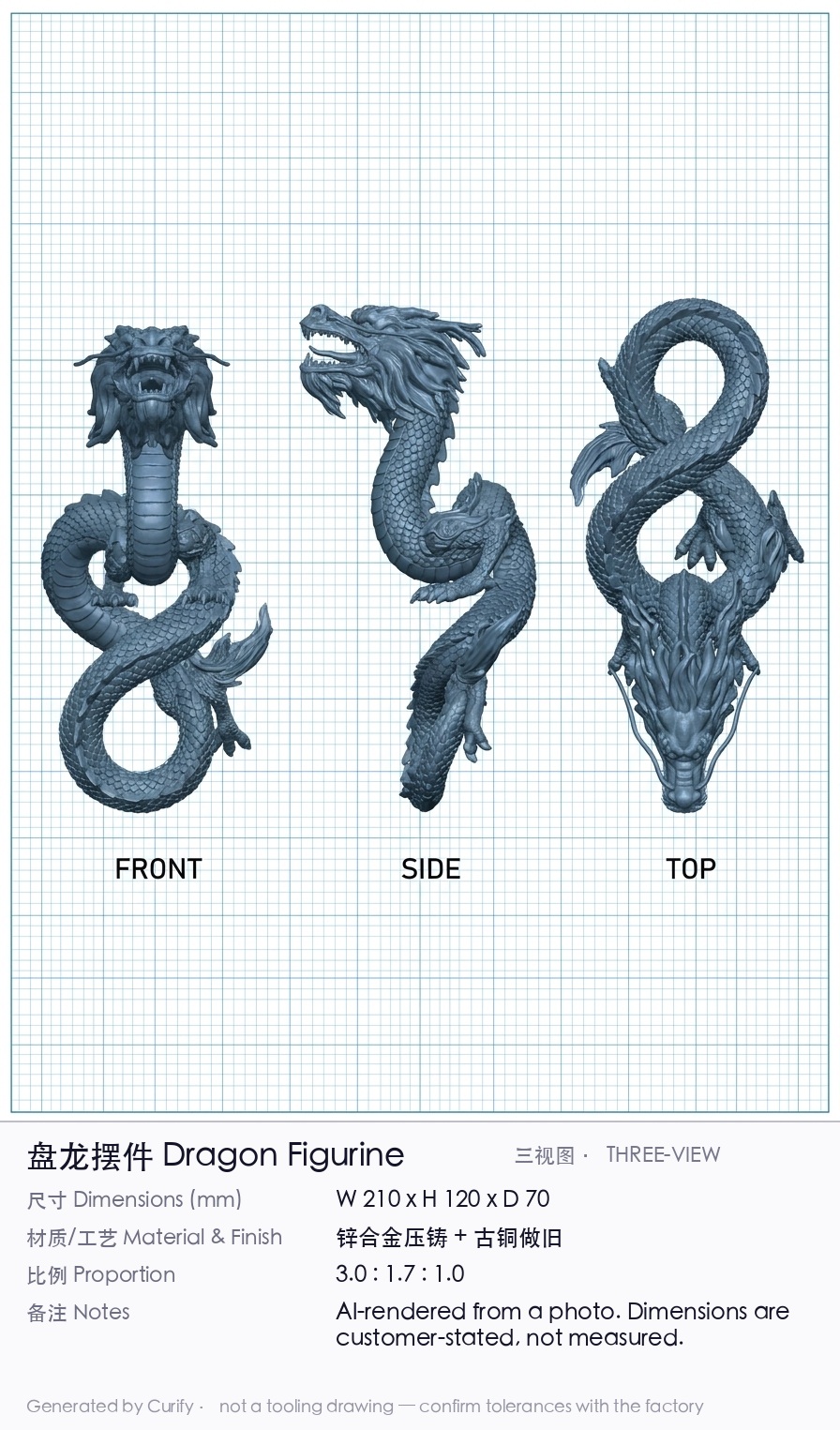
The dragon worked. One photo of a metal dragon figurine produced coherent front, side and top views at consistent scale. Its head, limbs and fins pin the geometry — there are enough unambiguous landmarks that the form is recoverable from a single angle.
The coiled snake failed. The same pipeline, the same prompt, produced *three different sculptures*. The loop topology changes between panels — count the loops across the three views and they do not agree.
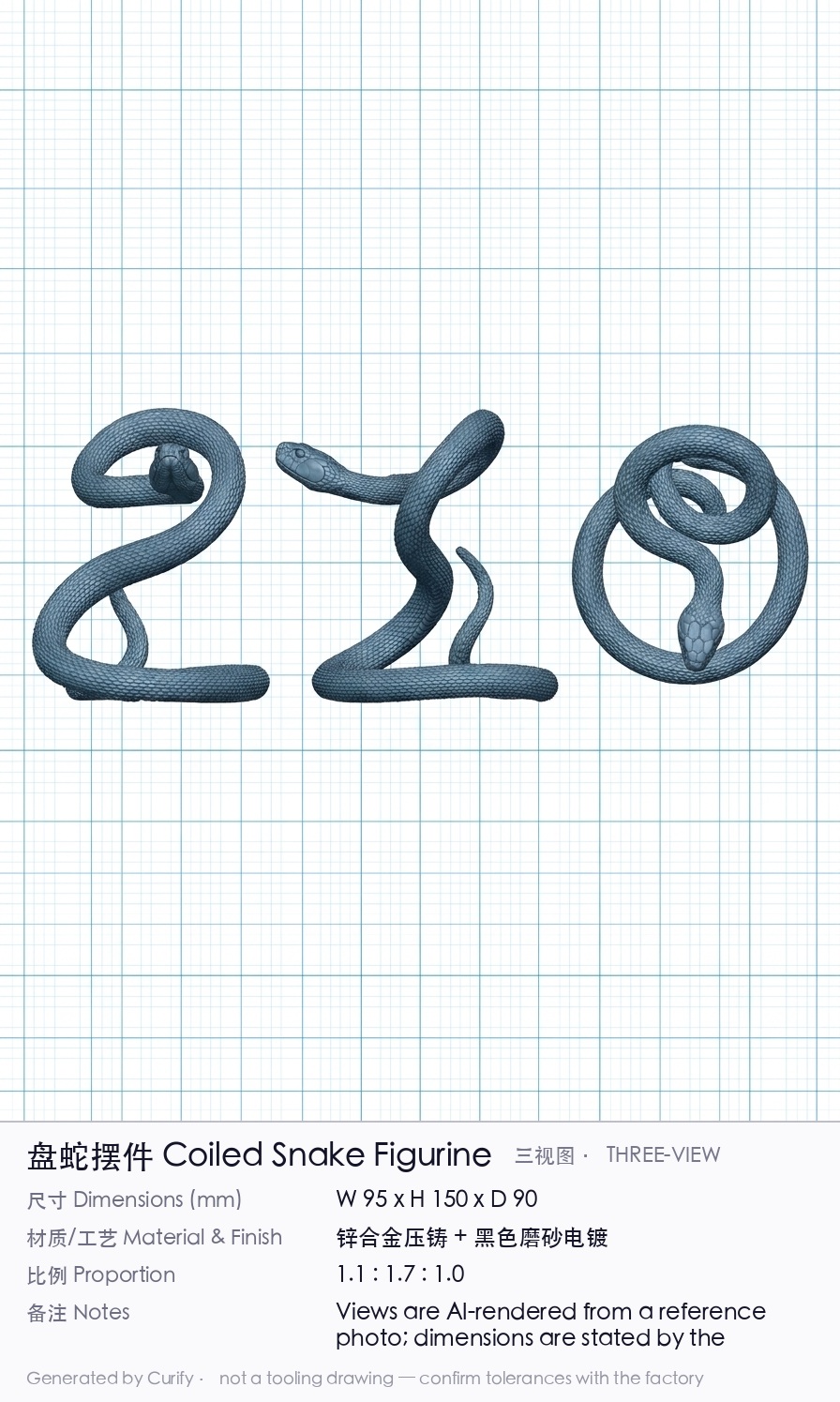
The diagnosis is not prompt quality. A single photo of a self-occluding glossy coil does not contain the 3D form. Which loop passes in front is genuinely ambiguous in the source image, so the model re-invented the topology for each view. No camera angle in the output can fix that, because the information was never in the input.
No amount of prompt tightening recovers information the photo does not hold. That is the sentence we would put on the wall. It is also the honest limit of every one-photo-to-3D tool you will be sold this year.
Two paths, and only one is reliable today
The failure above splits the workflow cleanly:
Path A — you already have a coherent turnaround. Skip the model entirely and draw the spec band onto the existing sheet. No generation, no quota, and the snake failure cannot occur by construction. This is the reliable path, and if you already have a character sheet it is the one to use.
Path B — you have one photo. Generate the views. This works on subjects with clear landmarks and fails silently on self-occluding ones — which is the dangerous part. Today nothing distinguishes a dragon-quality sheet from a snake-quality one without a human looking at it. It needs a consistency gate before it can be customer-facing, and until then a person has to check the loop count.
If you are starting from a character rather than an object, start from a consistent expression sheet and take Path A.
What we deliberately do not output
No STL, no STEP, no .blend.
That needs a mesh, and a single photo does not determine hidden geometry. A wrong mesh costs a steel mould rather than a re-render — the failure is expensive and it surfaces late.
The staged path we think is honest:
1. 三视图 — the dimensioned three-view, for quoting.
2. .glb — for approval only, so the client can rotate it and confirm the form.
3. .stl / .step — with wall thickness, draft angle and a watertight check, once the form is agreed.
Skipping to step 3 from a photo is how you pay for tooling twice.
Where Curify is, honestly
Our design-to-manufacturing tools currently stop at flat products, and now you know the reason: cut lines and dielines are 2D problems, and a figurine is not.
- Character Sticker Sheet — a consistent multi-pose sheet from one character, which is Path A's input.
- Die-Cut Sticker File — cut line, bleed and CMYK as a real production file.
- Acrylic Factory Export — artwork, white-ink plate and cut line as a factory package.
- The full merch design workflow, from character to factory-ready file.
Three-view generation is what we are working on now. If you make 3D product — figurines, plush, metal collectibles — tell us what your factory asks you for. We would rather build against your supplier's real spec sheet than our guess at one.
The short version
A character turnaround sheet becomes a manufacturing document when it has three orthographic views at one real scale, a spec band with material and dimensions, and a clear statement of what it is not.
Generate the views. Never let a model generate the numbers. And when a sheet comes back with three different silhouettes, do not rewrite the prompt — go back and look at whether your input photo ever contained the form at all.
One image is a sample. A product line needs the whole set.
Every Curify template runs in bulk. Send the list — SKUs, words, characters, teams, scenes — and we return the full set generated against one locked visual direction, so the line reads as a collection instead of forty unrelated images.
- Works on any template, not a special few — the same prompt structure applied across your whole list.
- One locked visual direction across the set, so a 40-design line stays on-brand end to end.
- Production-ready output where the format calls for it — die-cut paths, dielines, print resolution.
Take the next step
Putting what you read into practice.
Related Articles
merch-pod
Designer Toy IP Merchandise Design: The 2026 AI Production Workflow
AI Packaging Design: From Brief to Mockup Set in 30 Minutes