









Curify open resources · Version 1.0 · October 21, 2026
AI Photo Retouching Quality Checklist
Use this checklist to agree an editing brief, review a sample and decide whether a photo batch is ready to deliver. It covers wedding and portrait photography, fashion and ecommerce products. It works for manual, AI-assisted and mixed workflows.
Download and use it with your next batch
No signup required. The editable text includes a batch plan, defect log and sign-off fields. The JSON version lets workflow builders reuse the same checks.
Agree the acceptance rules before editing
Record the source files, reference look, permitted changes, must-preserve details, formats, dimensions and reviewer. Mark each check Pass, Rework, Hold, or Not applicable with a reason. Hold means do not deliver the affected file until the issue is resolved. These are proposed operating rules, not a certification or a measured quality guarantee.
Keep the original and output side by side at the same scale. Use 100% zoom for defects and the intended display size for overall appearance. An average quality score must not hide an identity change, altered product construction or an invented object.
The 18 review checks
1. Brief and permissions
Confirm the source image IDs, authorized use, output dimensions, background, colour reference, deadline and reviewer before editing.
Hold if scope or source permissions are unresolved.
2. Faces and identity
Compare each face at the same zoom: age, facial proportions, eyes, mouth and distinctive marks.
Hold any unintended identity change.
3. Skin texture
Inspect forehead, cheeks and neck for waxy smoothing, patchy colour, repeated texture and lost pores.
Rework visible texture loss outside the agreed finish.
4. Hair and fine edges
Compare flyaways, hairline, eyelashes, veil edges and fine fur against light and dark backgrounds.
Rework halos, missing strands and cut-out edges.
5. Hands and anatomy
Count fingers; inspect joints, limb boundaries, feet and overlapping subjects.
Hold added, missing or malformed anatomy.
6. Garment construction
Compare neckline, sleeves, hem, seams, fasteners, lace and folds with the source.
Hold changes to product construction or fit claims.
7. Prints and branding
Check plaid continuity, embroidery, labels, lettering and logo placement.
Hold altered branding, illegible labels or invented pattern details.
8. Material and surface
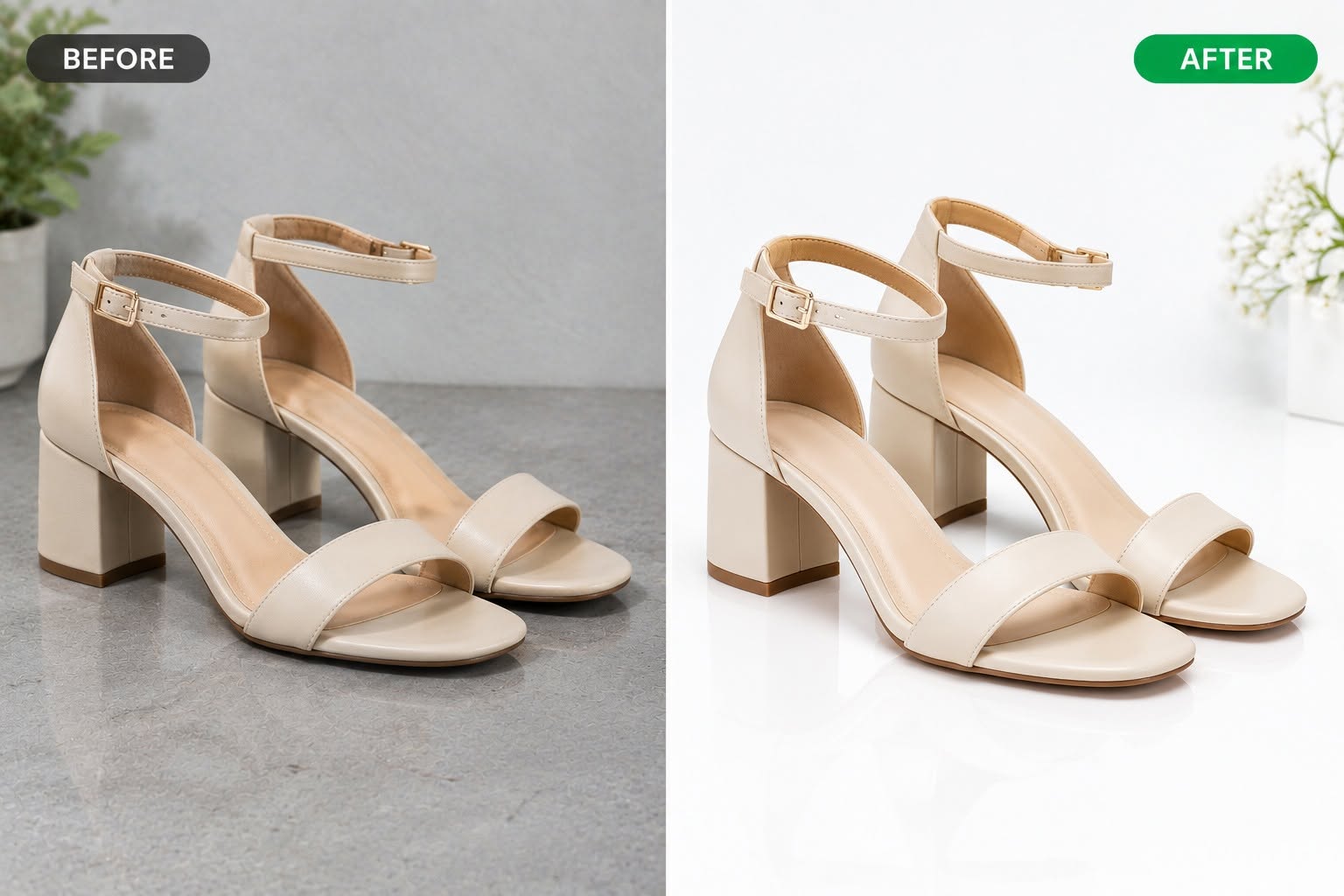
Review leather grain, satin sheen, suede nap, metal and stone facets. Do not mistake stronger highlights for accurate material.
Hold misleading product properties; rework accidental texture loss.
9. Jewelry geometry
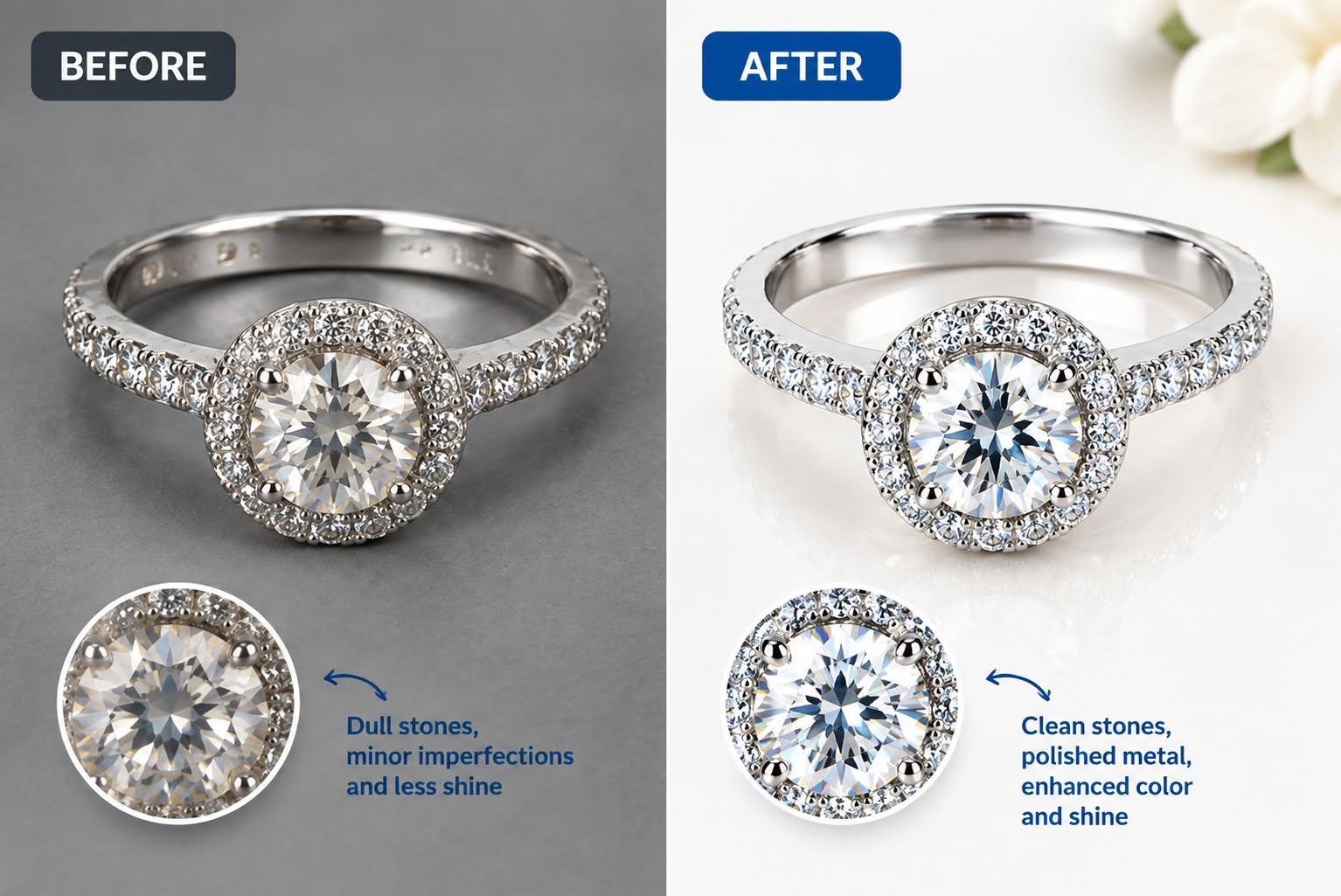
Inspect prongs, engraving, stone count and shape, band thickness and reflections at equal scale.
Hold changed construction, added stones or misleading gemstone appearance.
10. Colour consistency
Compare to an agreed reference on the same colour-managed display; check white balance and product hue across the batch.
Escalate colour-critical uncertainty; do not invent numerical tolerances.
11. Background and objects
Check for invented or missing objects, warped architecture and mismatched horizons.
Hold undisclosed scene changes outside the brief.
12. Shadows and grounding
Check contact shadows, direction, softness and reflections. Confirm that products and feet sit on the surface.
Rework floating products or inconsistent light.
13. Crop and geometry
Align source and output where framing should be retained. Inspect stretch, scale, rotation and perspective.
Hold an unapproved crop or geometry change.
14. Local edit boundaries
Inspect the boundary around each requested edit at 100% and at intended viewing size.
Rework seams, blur patches and repeated cloned texture.
15. File and resolution
Open exported files; verify actual pixel dimensions, format, colour profile, orientation and agreed watermark state.
Hold unreadable files or a delivery format that misses the brief.
16. Batch consistency
Review a contact sheet, then inspect each critical item individually. Cover every lighting condition, material, pose and processing variant.
Expand review when a sampled defect suggests a repeated failure.
17. Revisions and traceability
Record input ID, output version, requested change, reviewer, decision and evidence crop. Recheck corrected files.
Hold unresolved critical issues; do not overwrite the audit trail.
18. Delivery approval
Confirm agreed scope, all critical checks, outstanding rework and the approving person.
Release only explicitly approved versions; an average score cannot override a critical failure.
Worked review examples
These supplied and generated demonstration images illustrate what to inspect. They are not accepted customer deliveries or a scored benchmark. A bright result still needs comparison against the original product.
For skin, hair and wedding clothing, the wedding portrait review guide uses clearly labelled concept artwork to explain face, veil, garment and background checks.
Batch review and common failure decisions
- Review every image for critical changes: identity, product construction, branding and unapproved scene changes.
- Agree a separate finish-review sample: cover each lighting condition, material, pose and processing variant. Record the sample size and selection method; there is no universal percentage that makes a batch safe.
- Repeated colour drift or halos: expand review to the affected group, correct the shared process and recheck. Do not accept the batch because the hero image looks good.
- Waxy skin or missing lace: mark the exact area and requested correction. Keep the original, output version and evidence crop together.
- Invented objects or garment details: hold the file and verify whether the brief explicitly permitted the change. A prettier result is not approval.
Record revisions and sign-off
For each defect, record file ID, severity, requested correction, owner, output version and recheck result. Keep accepted and held files separate. Record who approved the final files and any explicitly accepted exceptions before delivery.
Reuse and attribution
You may copy, adapt and use the original checklist text and blank forms in commercial or personal workflows. Attribution to Curify is appreciated, not required. Example photographs, trademarks and third-party assets are excluded from this permission.
Suggested citation: Curify, AI Photo Retouching Quality Checklist, version 1.0, October 21, 2026. Link to this page so readers can find the version and downloads.
Need help reviewing or editing a batch?
Use the checklist to prepare your brief for our product photo retouching service or wedding and portrait editing service. Include image count, deadline, reference finish and must-preserve details. Scope and price follow sample review.