AI Event Card: Manus, Genspark, and What Actually Printed
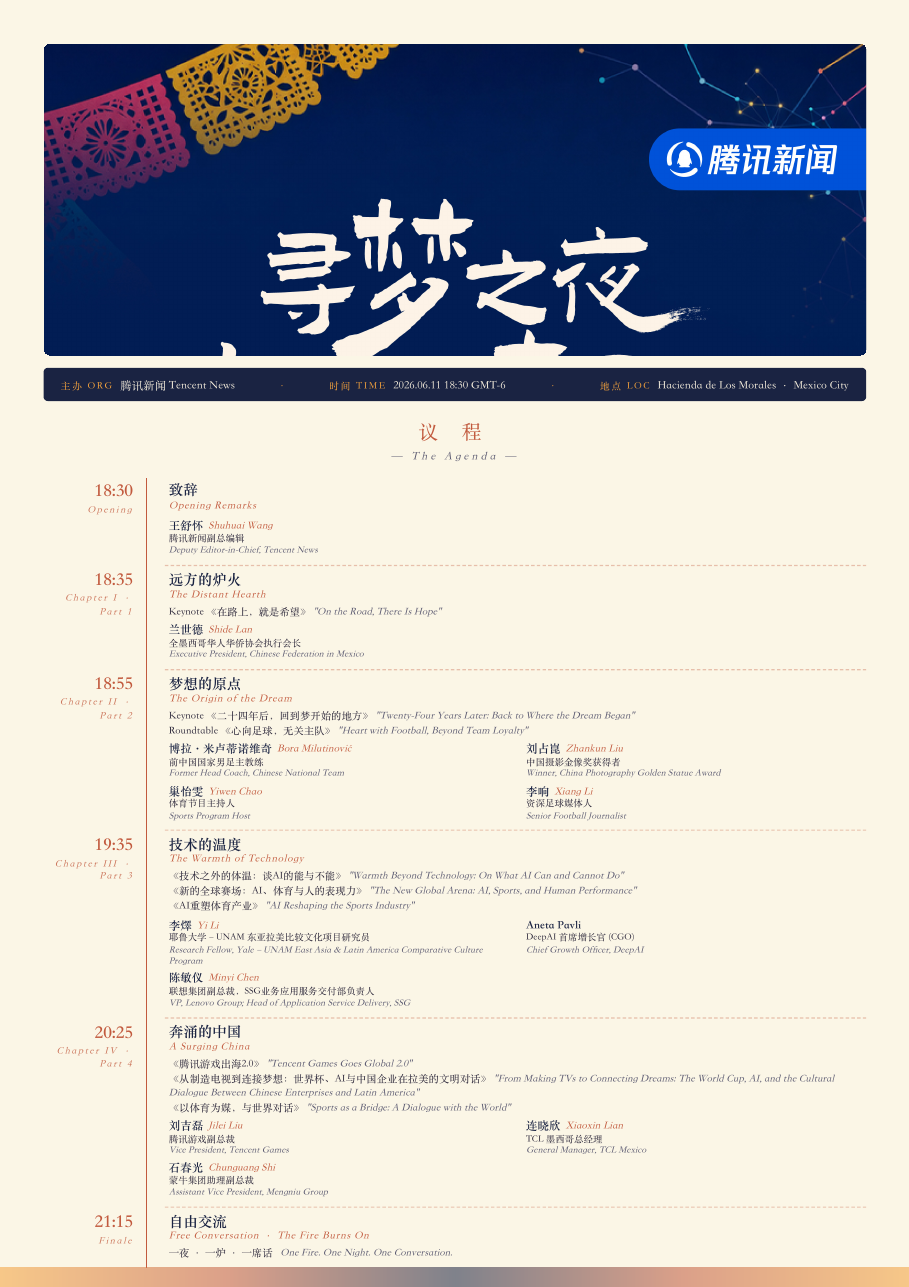
A Chinese news network running a World Cup 2026 opening-night dinner in Mexico City sent us a four-line brief: one A4 sheet, both sides, the event agenda on one side and the 36-guest directory on the other, Mexico papel-picado keyart at the top, as compact as possible without losing legibility in print. The names — bilingual Chinese + English, with titles like *中国驻墨西哥合众国大使馆文化专员* and *World Bank Economic Expert; Former AI Market Strategy Advisor, Microsoft Research Asia* — must spell right. We ran the same brief through three tools the same morning: **Manus** (agentic-AI document builder), **Genspark** (browsing AI with code execution), and our own stack of HTML+CSS with the keyart as a literal asset. Two of the three returned artifacts the team couldn't ship to a printer. This post names what each got wrong and the failure modes that hit any AI tool asked to produce dense bilingual print collateral. See also our [image-generation model comparison](/blog/image-generation-model-comparison) and the [industrial AI for illustrator IP](/blog/industrial-ai-for-illustrator-ip) case for parallel production-fidelity teardowns.
The brief that produced three different artifacts
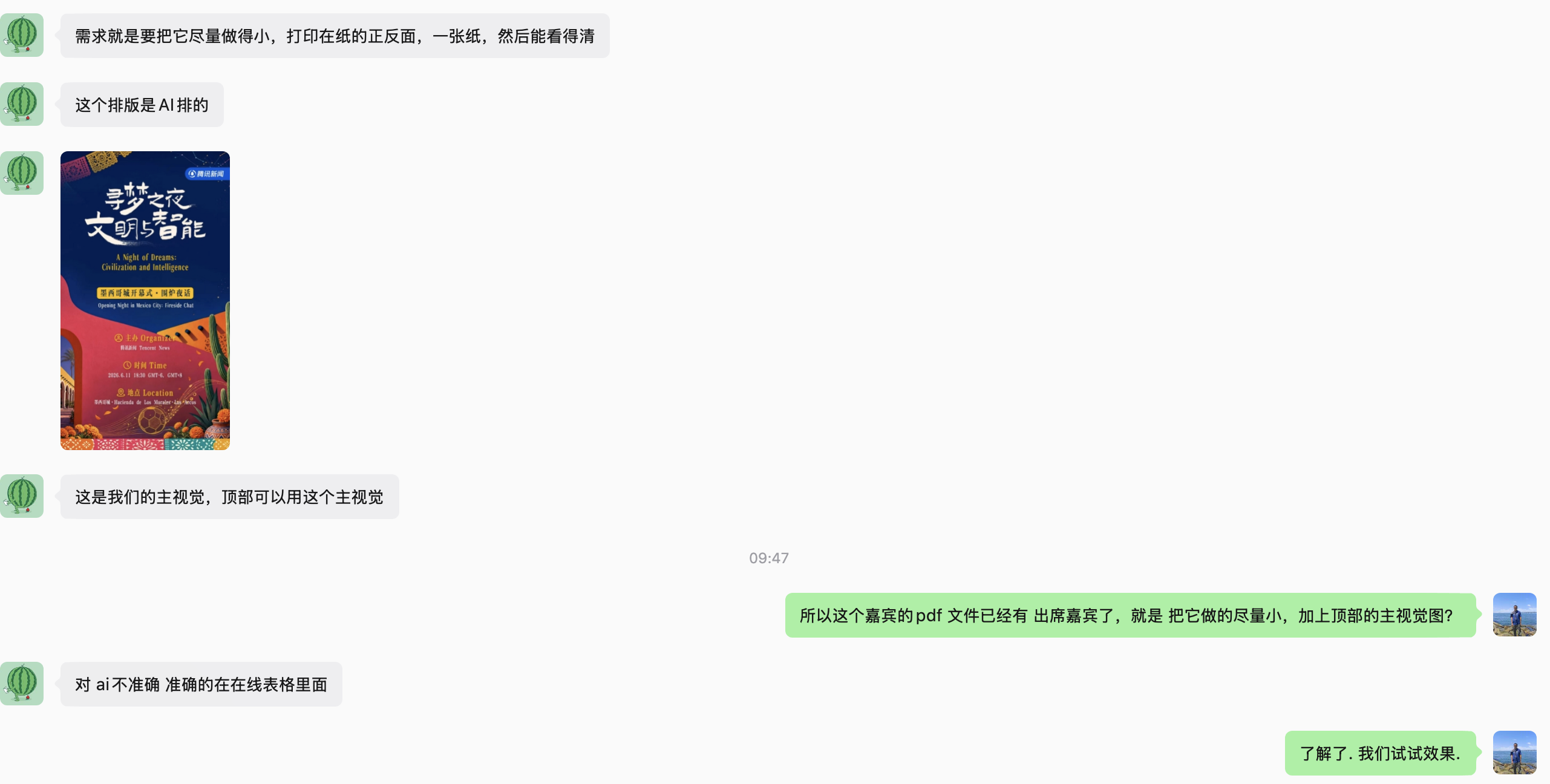
The screenshot above is the actual handoff. Translated, the four constraints:
1. One A4 sheet, both sides — single physical artifact at the center of each dinner table for the 36 attendees and speakers to share.
2. Compact but legible after print — dinner-table lighting, not studio. Anything under 6pt won't survive.
3. Keyart at the top — the Mexico papel-picado + adobe-arch + marigold poster the event team had already designed.
4. Source of truth lives in a spreadsheet — the team flagged that the AI-generated agenda draft had character errors and corrections were circled in an online sheet. The render must honor the spreadsheet, not invent.
What sounds simple becomes hard for two reasons. First, *table card* is ambiguous — it can mean one program card per shared table, or one folded place-card per attendee (桌签). The brief said the first; one of the three tools picked the second. Second, the 36-guest directory has mixed-script names — Latin-only (Andro Miralrio, Aneta Pavli), Chinese with romanization (王昕息 / Xinxi Wang), and 30+ character bilingual titles. Every cell must render perfectly. There is no "good enough" version of a printed name on a guest's place setting.
What each tool shipped
Manus: shipped a beautiful artifact for the wrong brief
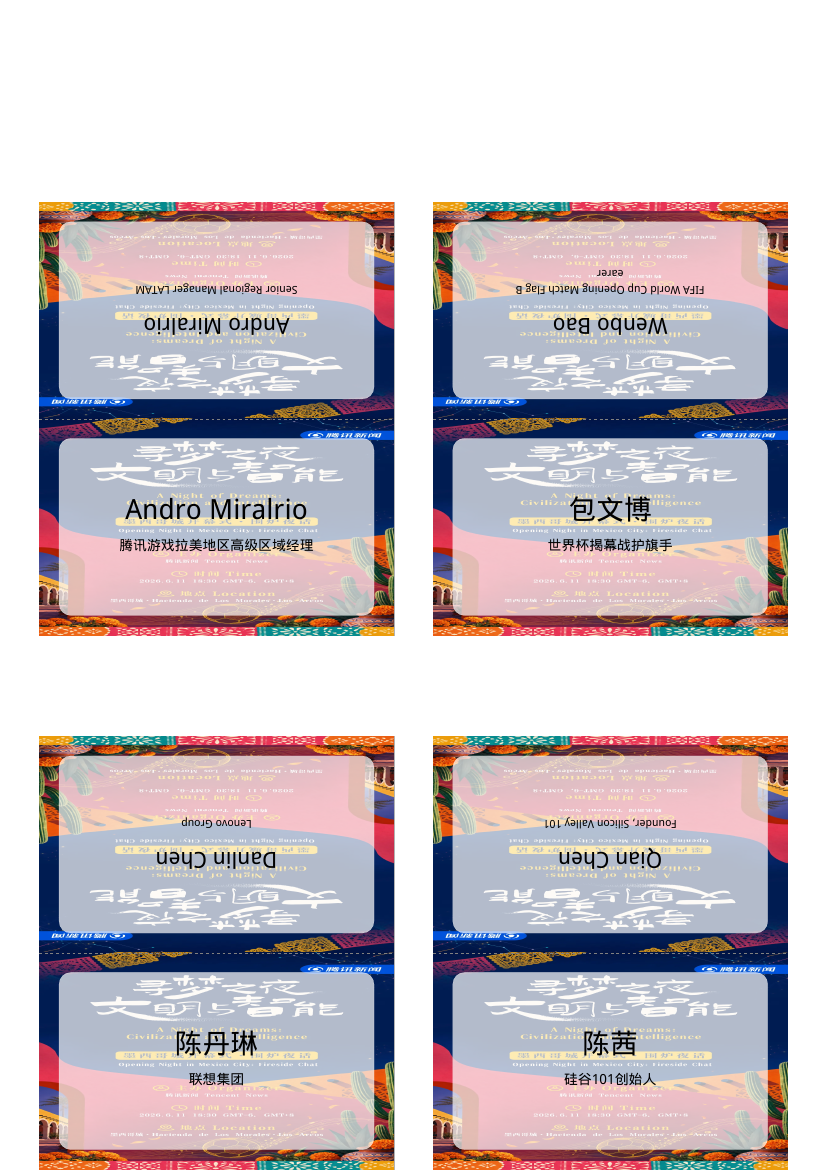
Manus interpreted *table card* as per-attendee place card and produced 9 A4 pages of 4-up fold-tent cards — 36 individual folded cards, one per dinner guest. The fold-tent geometry is well-executed: the top half of each cell is mirror-flipped, so when folded along the dotted line both faces read upright from across the table. Bilingual typography hierarchy on each card is clean. Names spell right.
But it's the wrong artifact. The brief asked for one shared A4 sheet with agenda on Side A and the full directory on Side B. The dinner team can't place 36 individual tents on a table that holds 36 guests sharing one program — that is a 10x print job in cardstock, scoring, and folding labor the team did not budget for. Worse, the per-attendee design omits the agenda entirely; a guest looking at the tent in front of them learns nothing about the program.
The takeaway isn't that Manus failed — it's that it failed *upstream of execution*. The agentic loop optimized confidently against the wrong target, and the artifact it produced was *more polished* than the one it should have produced. Both Manus and our own first read of the brief made the same interpretation error. The only thing that caught it was the human-in-the-loop correction step, which an agentic build skipped by design.
Genspark: shipped the right artifact, broken at the typography layer
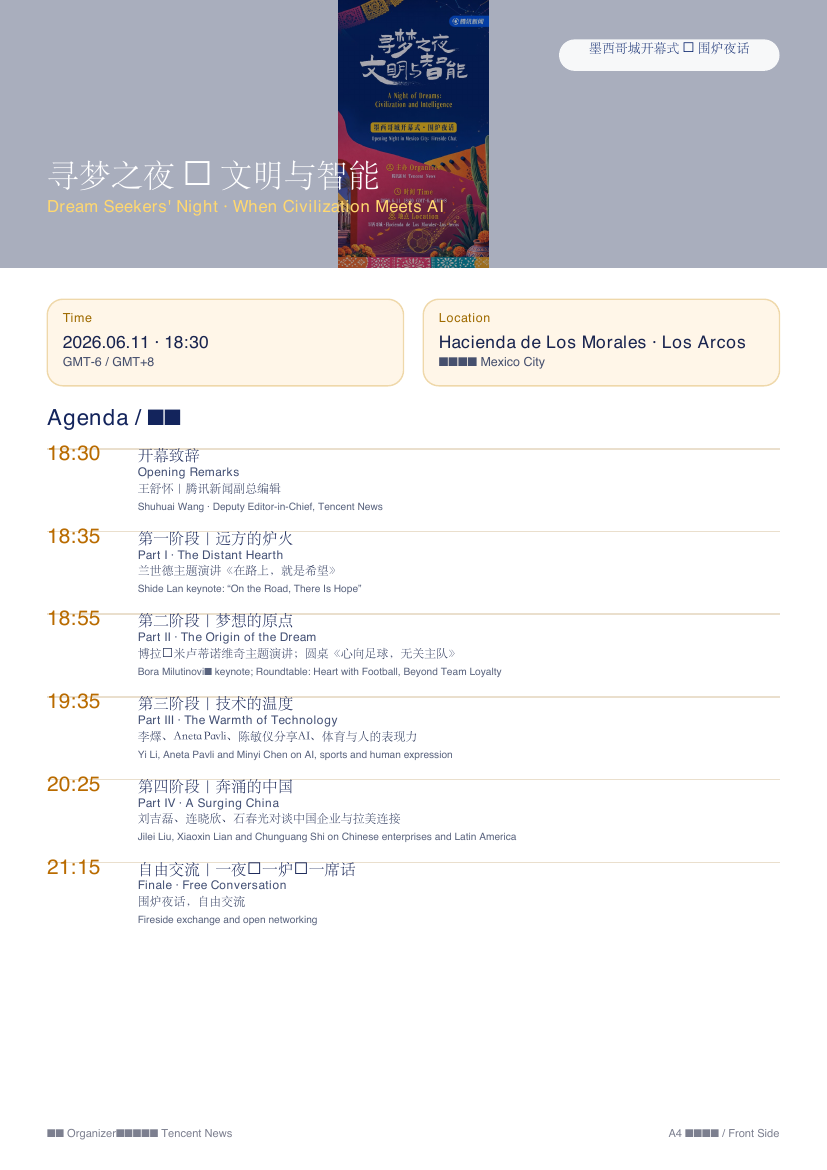
Genspark got the brief right — one A4 sheet, agenda on Side A, attendee directory on Side B. Structural layout is similar to what we eventually shipped: left-rail time column on the agenda, 4-column grid on the directory, bilingual cells. The typography layer has three ship-blockers:
1. CJK font fallback failures (tofu — □). Multiple Chinese characters across both sides render as the placeholder box browsers show when the font has no glyph. Genspark's serverless Chrome did not have a CJK font loaded. The agenda title reads *寻梦之夜 □ 文明与智能* — even the separator dot is unrenderable.
2. Romanization mangling on the directory. Side B shows names like Wenbo Bao□Wang, with Latin name fragments bleeding between adjacent cells. Classic LLM-tabulation hazard: asked to fill a tight grid from a list, the model loses the row boundary.
3. Misused keyart + unsubstituted placeholders. The keyart is shown as a stamp-sized thumbnail in the upper right of Side A, not as the banner the brief asked for. Two Curify Logo literal-text placeholders never got substituted out of the footer.
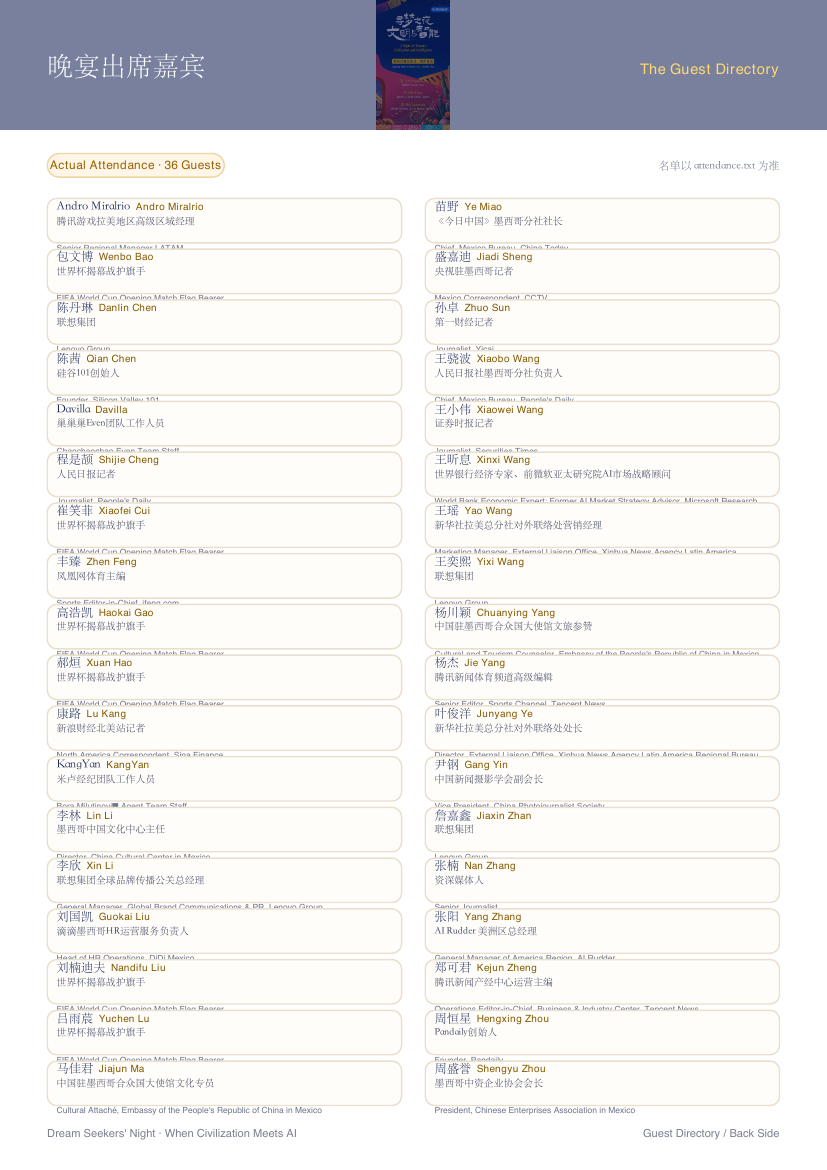
Genspark's failure is the inverse of Manus's. Manus shipped a polished artifact for the wrong brief; Genspark shipped the right artifact with broken execution. Brief interpretation correct, rendering pipeline can't honor the bilingual fidelity bar.
The fix: HTML and CSS with the keyart as a literal asset
Our team shipped a 2-page A4 PDF the dinner team can hand to any office printer for duplex output. The path was deliberately boring: a single event-card.html with embedded print CSS, two @page rules sized to A4 portrait, the keyart used as a literal background image (no AI re-render), Chrome headless to export the PDF.
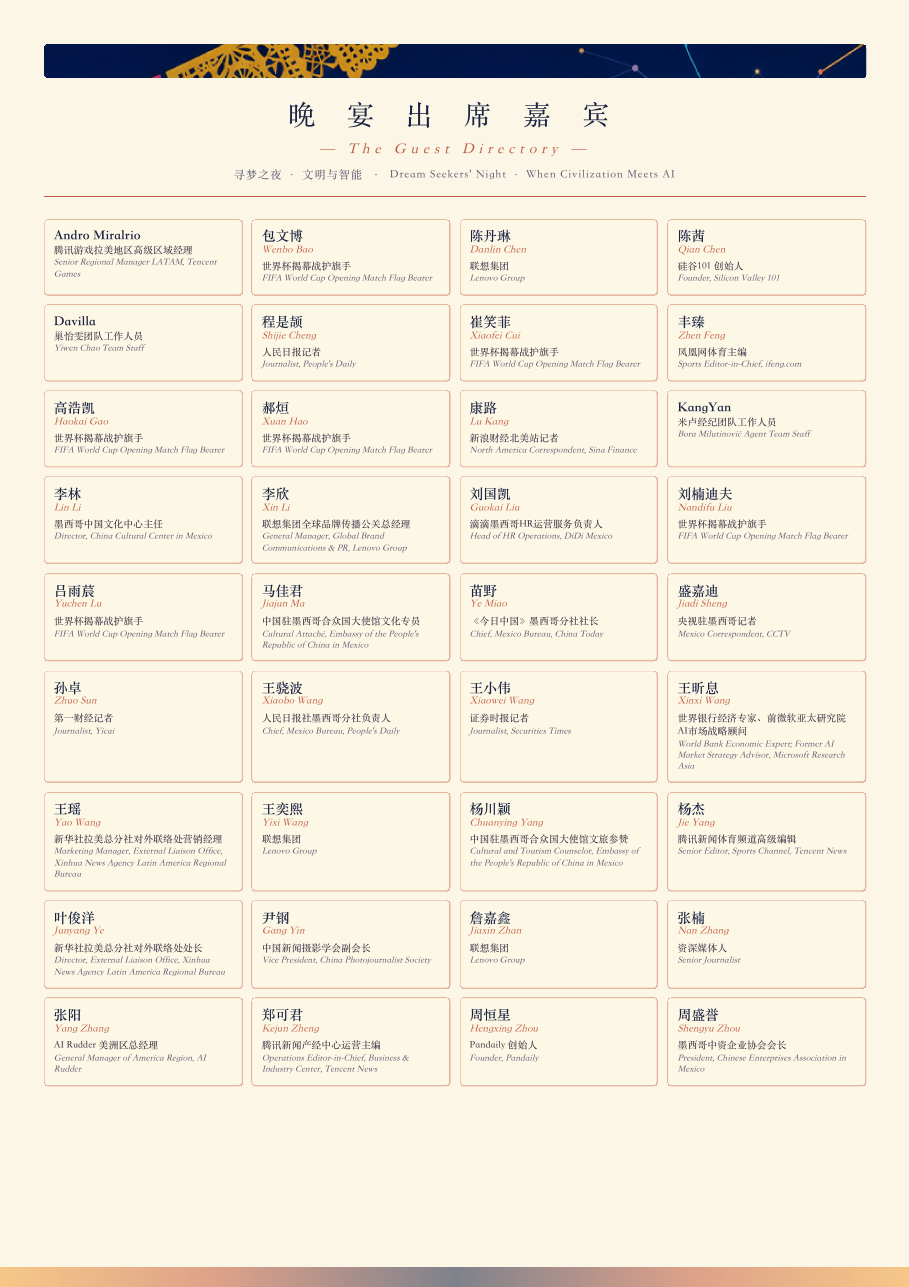
Four design moves:
1. Banner as raster, not as generation. The 3125x5558 keyart JPG the event team already designed becomes a CSS background-image showing the top 72mm. Zero AI involvement at the visual layer, zero risk of a hallucinated glyph on the brand asset.
2. Text as actual text. Every name, title, time, and chapter heading is a real DOM text node served by the host browser's CJK font stack (Source Han Serif → Noto Serif CJK → PingFang → Songti fallback). Output is text-selectable; every glyph renders identically across Preview, Adobe Reader, and an office laser.
3. Spreadsheet as input. The 36 guests come straight from attendence.txt (tab-separated). No LLM rewriting. If a row is wrong, it's wrong in one place.
4. Print geometry as math. A4 = 210x297mm. Side A's 72mm banner + meta + header + 5-chapter agenda + footer fits the remaining 205mm usable. Side B's 4x9 grid (36 cells × ~27mm + header) fits 270mm. Tuned twice against the rendered PDF.
Total build time: ~90 minutes including two render-tune loops on Side A spacing. What an actual print designer would ship — authored in HTML+CSS rather than InDesign.
Why bilingual print collateral breaks open-ended AI tools
Three failure modes are systemic, not tool-specific. The next AI-document tool you try will hit at least one by default, and the one after that will hit two:
1. CJK font fallback in serverless rendering. Server-side Chrome (Playwright, Puppeteer, Browserless) inherits the system font stack of its container. Most Linux containers ship Latin-only (DejaVu, Liberation). Hand it 寻梦之夜 and every Chinese glyph renders as the .notdef tofu box (□). Fix: one apt-get install fonts-noto-cjk in the container build — but the AI tool's preview shows it fine because the *generation step* runs in a CJK-fonted environment while the *PDF render step* runs in a different container. The bug is invisible until the user opens the artifact.
2. LLM tabulation losing row boundaries. Genspark's Wenbo Bao□Wang is the model concatenating two adjacent rows of the directory while trying to lay them out. Asked to render a 36-row list into a 4x9 grid, the model operates on the linear sequence; spatial-to-linear mapping is a non-trivial step it does not always perform correctly. Fix: give the layout engine the 36 cells as a structured array and never let the model re-derive the coordinates.
3. Brief ambiguity compounded by agentic loops. A human PM hearing *table card* would ask *do you mean one card per attendee, or one program per shared table?* and disambiguate. An agentic loop picks an interpretation, plans, generates, and ships. By the time you see the output, you're reviewing a 90%% finished artifact for the wrong brief — and the sunk-cost gravity of *it looks done* makes the interpretation error harder to spot.
Decision framework: when AI image-gen, when HTML+CSS, when AI-assist plus human curate
This brief selected for HTML+CSS. A Pinterest-pin brief selects for image-gen. A 30-template-family content drop selects for AI-assist + human curation. Three rules of thumb:
AI image-gen when the artifact is a single hero visual with low text density, audience views on screen (minor glyph errors forgivable), and *almost right* is acceptable. Marketing heroes, social cards, mood boards, product mockups. See our style transfer guide and product photo generator workflow.
HTML+CSS (templated or hand-crafted) when every glyph must be perfect, the artifact is destined for print or PDF, the layout is grid-shaped with many cells, and content has a single source-of-truth file. Event programs, conference badges, name-card sheets, invoices, certificates, menus, wedding seating charts. The rendering pipeline must include the right fonts; content must come from the source-of-truth file with zero LLM rewriting.
AI-assisted + human-curated when volume is high (50-500 artifacts), visual identity must be consistent, and content fields are structured. Curify's daily drops produce hundreds of bilingual nano-template inspirations a week this way — gpt-4o-mini handles structured fields + aliases, the template-prompt pipeline handles the visuals, a human reviews the batch before sync. See the cross-border ecommerce SEO case for the structured-content parallel.
The mistake all three tools made on this brief: treating *bilingual event print* as if it were *bilingual marketing image*. Share words. Don't share the fidelity bar.
Where this approach still has limits
The HTML+CSS-with-keyart-as-asset approach is not unconditional. Three honest caveats:
Only works when the keyart already exists. If the event team hadn't shipped a designed poster, generating the keyart itself would be a separate image-gen job (where AI tools actually shine — see the lane definitions above). The path here assumes the brand-visual layer is done; we layer text on top.
Print typography still takes design judgement. Two render-tune loops on Side A spacing happened because the first render overflowed and cut off the 21:15 Finale row. The 12pt clock / 9.5pt chapter / 7pt speaker hierarchy was tuned by eye against the rendered PDF, not derived by formula.
36-cell grid scales until it doesn't. A 60-guest dinner forces the directory onto two pages or shrinks cells under 5pt where legibility breaks. Above ~50 guests, the right move is a directory pamphlet, not a single shared sheet — different brief, different tool.
Common questions:
*Q: Could you have used InDesign or Figma instead?* Yes. We used HTML+CSS for the iteration loop — every *shrink the banner 20mm and re-fit* cycle is one Chrome-headless rerun. For one-off jobs InDesign is fine; for jobs we expect to template later, HTML wins on iteration speed.
*Q: Why not use Nano Banana or DALL-E to render the whole sheet as one image?* Because every name must spell right. Current image-gen models including Nano Banana Pro introduce character-level errors on dense bilingual text at non-zero rates. For a printed place setting where one misrendered glyph is a serious incident, take the deterministic path. See the image-generation model comparison for the fidelity benchmarks.
*Q: How long did this take?* ~90 minutes to build (including the brief-interpretation correction loop), 5 minutes to render, 0 minutes of font-debugging because Chrome headless on macOS picks up the system CJK stack. Manus and Genspark each took ~10 minutes to generate, plus the time to triage that each artifact couldn't ship.
*Q: Will this work for our wedding seating chart / conference badge sheet / restaurant menu?* Yes, with the same constraints: source-of-truth file exists, brand assets exist, print geometry is calculable. The HTML lives at raw/[your-project]/event-card.html and re-renders with one Chrome command.
Tools & Resources
Learn about the best tools available...
Where Curify fits — and where it doesn't
We built this table card by hand — HTML, CSS, Chrome headless, the event team's keyart JPG. The reason we shipped print-ready in 90 minutes wasn't the toolchain; it was the *taste* that comes from running the Curify bilingual content pipeline daily. We ship 235+ nano-templates across 10 locales with thousands of bilingual inspirations a month; we've hit every CJK-font and tabulation-bleed failure mode an AI tool can hit, and we know which lane each brief belongs in before generating a pixel.
The bilingual print-collateral lane is exactly what Curify is built for next. What you saw in the *event-card.html* fix — keyart-as-asset banner, spreadsheet-as-source-of-truth, text-as-text rendering, print-geometry math — is templatable. The same shape applies to dinner programs, conference badge sheets, speaker briefing books, museum exhibit panels, multilingual restaurant menus, wedding seating charts. Today these are one-off jobs we hand-author per client; the natural Curify product is the templating layer above this shape — pick a layout, drop your spreadsheet, drop your keyart, pick your locales, render to print-ready PDF. If you're running a publisher operation or event series and you hit this shape more than once a month, talk to us — we want production design partners as we ship the print track in 2026.
What Curify already does well, today:
- Daily bilingual content drops — 5-15 new inspirations/day across the 235-template catalog, with auto-tagged search aliases (EN + ZH) and 10-locale i18n. See the most-trafficked nano-templates.
- Bilingual landing pages at programmatic-SEO scale — playbook in our Webflow programmatic SEO integration tutorial and content-automation case study.
- Templated visual artifacts for publishers — see the publisher use case for the operating model.
The honest call: we used a hand-authored HTML+CSS path *this time* because the volume was one. The next client with the same shape gets a template — and the cycle compounds. If that arc resonates, get in touch.
Three principles for AI in bilingual print collateral
If you're about to brief an AI tool to produce an event program, conference badge sheet, wedding seating chart, or any bilingual print artifact where every name must spell right:
1. Re-read the brief out loud before you generate. Ambiguity compounds in agentic loops. *Table card* is ambiguous; *event program card placed on each shared table* is not. Two minutes upfront, one round trip saved.
2. If text-fidelity matters more than visual sophistication, leave image-gen out of the rendering loop. Use AI for the brand-visual asset; use HTML+CSS (or a print-design tool) for the text layer.
3. Source-of-truth must live outside the AI. A spreadsheet, a JSON file, a database export — anywhere the AI can't rewrite. The AI's job is to render; the source-of-truth's job is to be right.
If you're facing a similar brief, copy event-card.html, swap your spreadsheet, swap your keyart, re-render. See the Curify publisher use case for the engagement model, or the Curify Webflow programmatic-SEO integration for the high-volume bilingual content workflow.
Take the next step
Putting what you read into practice.
İlgili Makaleler
Creator Tools
Tasarımcı Oyuncak IP Ürün Tasarımı: 2026 AI Üretim İş Akışı

Midjourney vs DALL-E 3 vs Nano Banana vs Stable Diffusion (2026)