AI Product Photography: One Hero Shot to 100+ Brand-Consistent Variations

When someone searches *AI product photography*, they want one of two things: photorealistic product shots that don't look AI-generated, or a way to multiply a single brand asset into a season's worth of creative without re-shooting. In 2026, both are economically obvious — for the right product categories and the right workflow. Traditional catalog photoshoots run **$200-2,000 per SKU** when you include studio, photographer, model, props, and post-production. AI product photography collapses that to pennies per image — but only if you can avoid the consistency trap (generic AI generation produces 1,000 visually different interpretations of *product photo* across 1,000 product pages). Templated generation closes that gap: lock the style once, vary only the subject per variant, get a catalog that looks like one art director produced it. The DTC promise this guide is built around: **one product photo in, 100+ brand-consistent creative variations out — in under a day.** Five Curify templates anchor a four-stage pipeline covering packaging mockups, promotional posters, ecommerce detail pages, and (for apparel + accessories) sizing-fit infographics.
What 'AI product photography' actually delivers in 2026
Three things AI product photography is now reliably good at:
1. Photorealistic single-product shots. Nano Banana Pro, GPT Image 2, and Midjourney v7 have all crossed the fidelity threshold where AI output is hard to distinguish from a real catalog photoshoot for the everyday SKU. Soft-lighting, clean backgrounds, accurate material reflection — packaging, jewelry, apparel, electronics render at retail-listing quality.
2. Brand-consistent variations at catalog scale. This is the real unlock. Lock the brand visual fingerprint (palette, lighting, prop vocabulary, composition density) into a template, swap only the SKU per render. 100+ variations all reading as one art director's output — what would have taken a 4-person creative team a month ships in a day.
3. Format conversion from a single reference. Take one hero shot, output the same product as a packaging mockup, a retail-shelf scene, an ecommerce detail-page composition, and a promotional banner — without re-shooting.
What is still hard: extreme product complexity (transparent perfume bottles with specific liquid color), exact reproduction of an existing real product's micro-detail, and any composition where the AI has to invent text it has not seen. None of these block 90% of DTC catalog work.
The four-stage AI product photography pipeline
Stage 1: Lock the hero shot + brand fingerprint
Start with one good hero shot of your product. A real photo if you have one, a clean AI render if you do not. This becomes the reference everything downstream is conditioned on.
The brand fingerprint is everything beyond the product itself — palette, lighting register, prop vocabulary, composition density. Lock these as a template-level style guide so every downstream render respects them. That is what makes 100+ variations feel like one catalog instead of 100 different freelancers.
Curify's character-lock mechanism (originally built for illustrator IP series-consistency) applies identically here. The *character* is your brand's visual fingerprint; the lock is the same kind of constraint layer.
Stage 2: Packaging mockups + retail-shelf renders
Packaging is where AI product photography pays for itself fastest. A real packaging photoshoot needs the actual printed packaging — meaning you cannot show finished product until after the print order. AI lets you mock up packaging from a flat design file and drop it into retail-shelf, gift-box, and lifestyle scenes before committing to print.
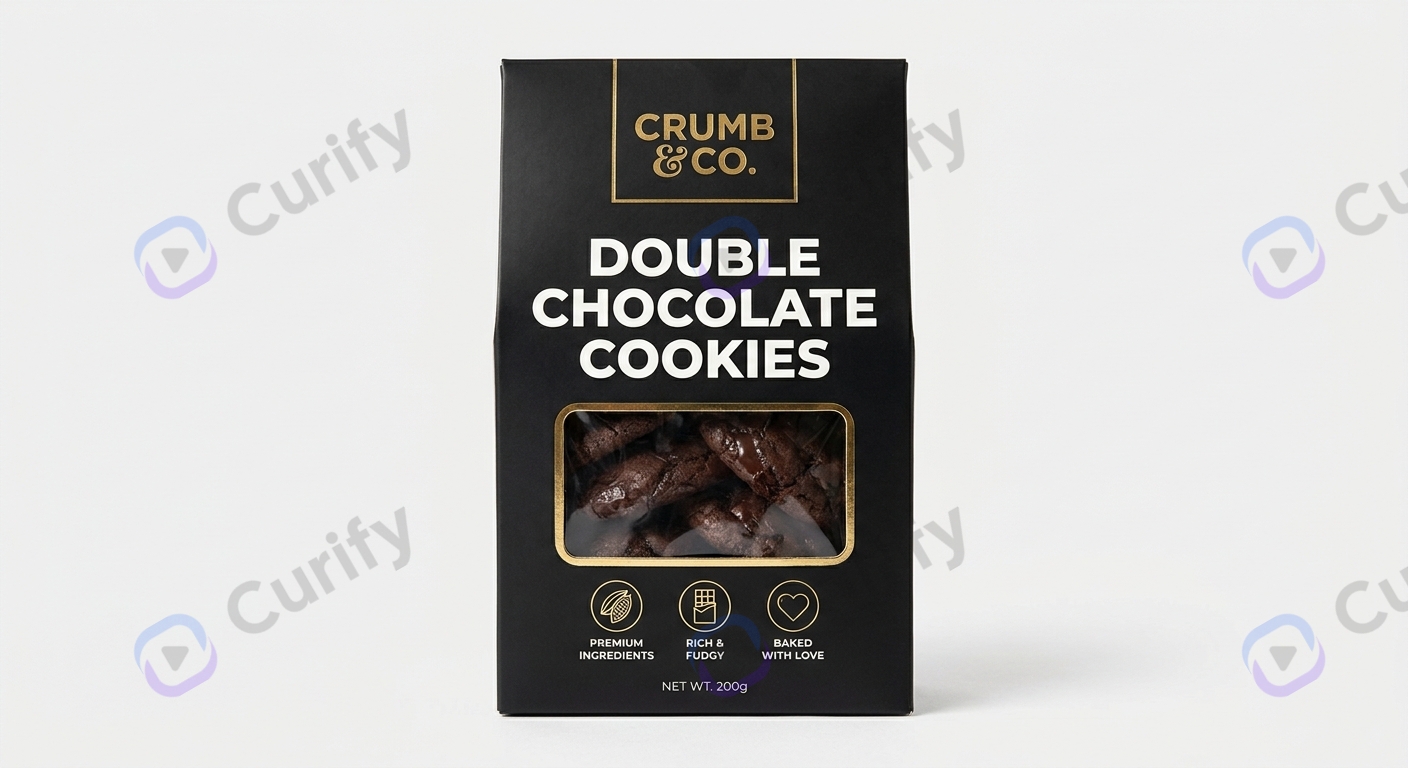
Open the Food / Product Packaging Design template →
The template handles surface mapping (label conforms to bottle/box geometry), realistic lighting (soft retail-shelf overhead), and material accuracy (foil vs matte vs gloss reads correctly). Drop a label PSD or PNG in; the template returns retail-shelf-ready visuals.
Stage 3: Promotional posters + lifestyle creatives
Two template families handle the marketing layer above the listing. Use them in tandem: lifestyle product showcase for organic / brand-aspirational placements, promotional banner posters for paid + seasonal sale creative.
Open the Product Poster (lifestyle showcase) template →

Open the Product Theme Promotional Poster template →
The lifestyle template renders the product into an aspirational interior or environmental scene (good for organic social, brand site, newsletter hero). The promotional template adds copy slots, sale-banner geometry, and palette-locked brand color so the output drops straight into a paid-ads or shopfront-banner pipeline.
Stage 4: Ecommerce detail pages + sizing infographics
The bottom of the funnel — what converts the click into a purchase. Two templates handle the two distinct ecommerce needs.

Open the Fashion / Ecommerce template →
The ecommerce template handles single-product PDP visuals — clean studio lighting, configurable angle, swap-in / swap-out of color or material variants. Works for apparel, jewelry, accessories, small home goods.
For apparel + wearable accessories, the sizing-fit infographic template handles the conversion-driving overlay that PDPs frequently miss:
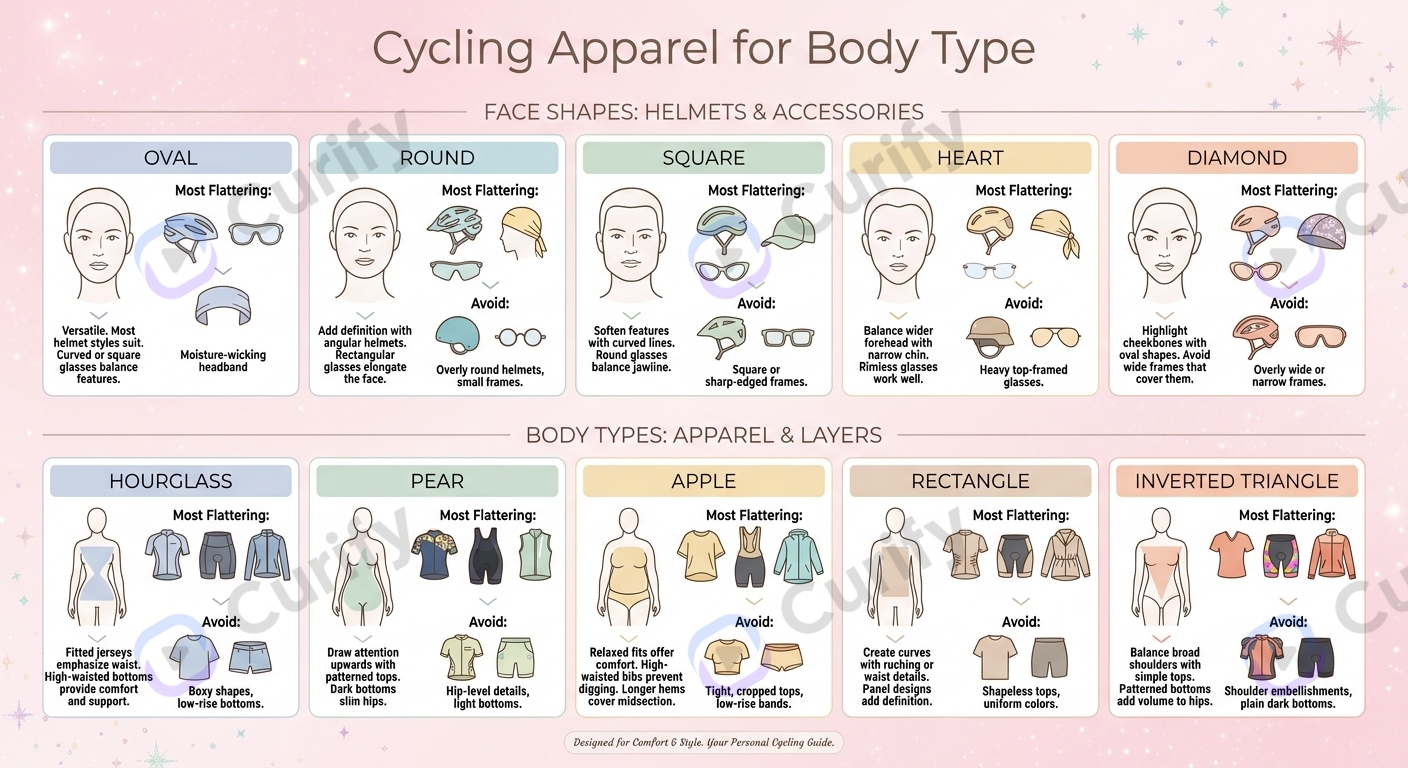
Open the Fashion Shape Guide Infographic template →
Returns drop measurably when shoppers can pre-visualize fit. This template is the cheapest return-rate reduction lever in the catalog playbook.
Where AI product photography still falls short
Three places the workflow does not deliver:
Hero shot quality is a floor. Templated expansion conditions on your reference — a weak hero produces a weak catalog. AI does not save a bad source. Invest in one good shot per SKU family; the workflow does the rest.
Hyper-detailed SKUs still need real photography. Transparent perfume bottles with specific liquid color, watches with engraved micro-text, jewelry with specific gemstone cuts — these still beat AI for the moment. The 90% of DTC SKUs that are not in this tail-end category are well within range.
Brand-consistency drifts past ~150 variations per template. Beyond that, retrain or split the template. Most catalogs ship well below this threshold, but high-SKU operators (1,000+ variants per season) need to plan retrain cycles into the workflow.
Tools & Resources
Learn about the best tools available...
Two engagement models for DTC brands and ecommerce sellers
Model A — Catalog-as-a-service for DTC brands. Curify produces the lead-shot lock + 100+ brand-consistent variations as a finished catalog drop. Per-SKU + per-batch pricing with long-term partnership discounts. Best fit: DTC brands shipping 50-500 SKU seasonal drops who want catalog visuals without rebuilding the AI workflow internally. Turnaround for a first full catalog: one day per 100 SKUs once the hero shots are in.
Model B — Workflow licensing for in-house design ops. For brands with their own designer + creative team, Curify ships the deterministic-workflow stack as API endpoints + configurable template components. The brand integrates against existing asset management, runs their own batches, keeps creative judgment internal. Best fit: established DTC brands and ecommerce operators with 500+ SKU annual catalogs.
Both paths preserve the core promise: one product photo in, 100+ brand-consistent variations out. The difference is whether Curify ships the assets or the workflow.
Ship a 100-SKU catalog this week
If you are a DTC brand or ecommerce operator about to commission a seasonal catalog photoshoot — talk to us first. The 100-SKU drop that traditionally takes a 4-person creative team a month ships in a day with the four-stage workflow above. A first iteration (10 SKUs across packaging + lifestyle + ecommerce + sizing infographic) takes 24-48 hours from receiving your hero shots and brand-fingerprint reference.
Reach out via /contact for an initial scoping conversation. Or try the workflow yourself on the live demo at /tools/ai-product-photo-generator.
Popular Template Examples
Explore our most popular Nano Banana prompt templates to see what's possible:
One image is a sample. A product line needs the whole set.
Every Curify template runs in bulk. Send the list — SKUs, words, characters, teams, scenes — and we return the full set generated against one locked visual direction, so the line reads as a collection instead of forty unrelated images.
- Works on any template, not a special few — the same prompt structure applied across your whole list.
- One locked visual direction across the set, so a 40-design line stays on-brand end to end.
- Production-ready output where the format calls for it — die-cut paths, dielines, print resolution.
Take the next step
Putting what you read into practice.
Related Articles
merch-pod
Best Programmatic SEO Tools in 2026: AirOps vs Webflow vs WordPress at Scale
Style Transfer AI in 2026: Turn Video into Ghibli, Pixar, Anime, and 4 More Styles