PROJECT NOTES / 03 · BATCH PRODUCT IMAGES
Batch product image QA: revising 12 images without restarting 96
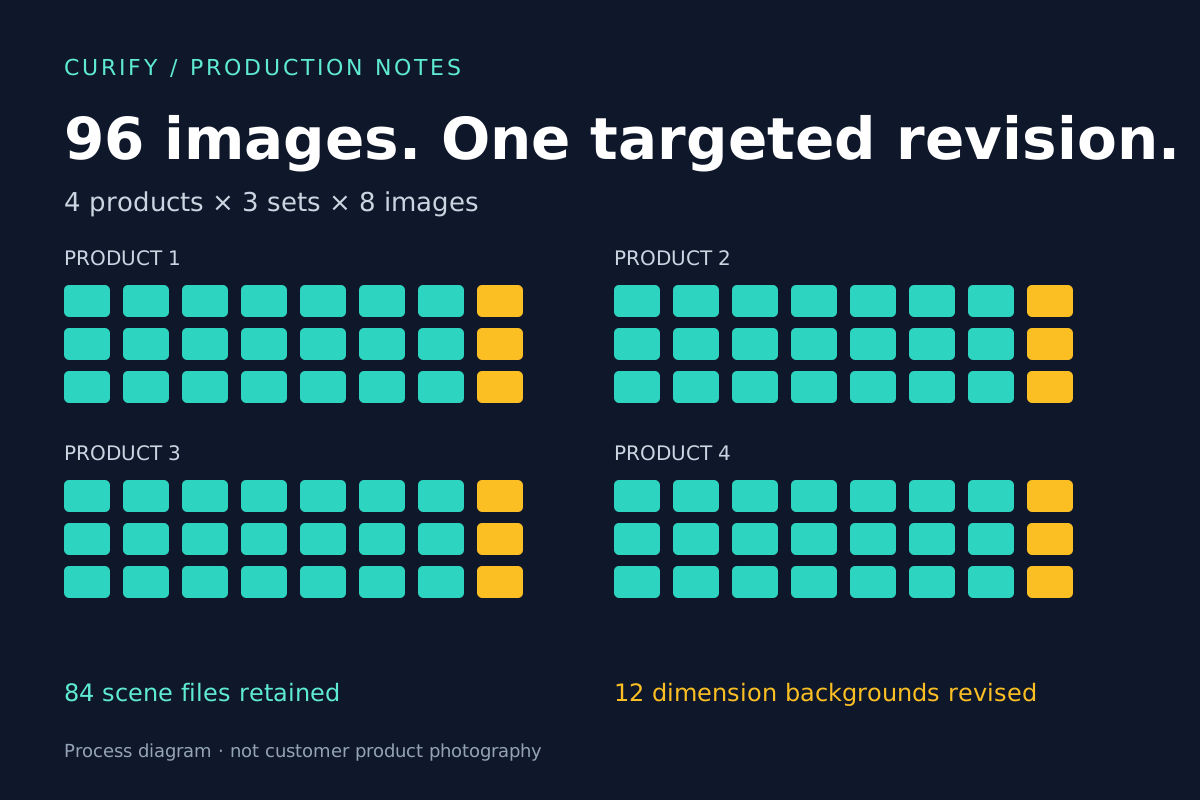
The difficult part of a product-image batch is deciding what may change—and proving that everything else stayed put. In this project, a late background revision affected 12 dimension images. The other 84 scene images did not need to be remade.
Curify ·
Anonymized production process · final customer acceptance unconfirmed
- products
- 4
- image sets
- 12
- final files
- 96
- pixels per image
- 800 × 800
The brief: variation across sets, consistency within each set
The project covered four practical products: a mop kit, a garden arch, garden edging and a scraper set. Each needed three distinct image sets with eight images per set. Source product photos established product identity; separate references guided the scenes and dimension artwork. The initial quantity wording did not add up, so the scope was clarified to 4 × 3 × 8 = 96 before production.
The finish needed a clean, coordinated palette, square exports and no white borders. Each set also needed a dimension image whose product and measurement annotations stayed unchanged. Scene variation could be creative; product construction and dimensions could not.
One batch, two different editing rules
Product 1
Product 2
Product 3
Product 4
How the production was split
01
Resolve the source pack first
Match each requested product to its source photo and dimension diagram. Exclude unrelated style references from the product list. Keep source measurements as supplied; do not silently “correct” inconsistent references.
02
Build and review scenes in sets
Generate scenes around the supplied product and review the full set together. Compare construction, relative scale and use—not only lighting and colour. A coherent palette cannot compensate for an invented component.
03
Protect dimension artwork separately
Use the resized source product, text, arrows and numbers as a protected layer. Generate the empty background separately, then composite. The measurement artwork does not need to pass through another generative redraw.
What internal QA sent back for repair
The retained repair records show product and usage errors caught during internal review. These are our production checks, not attributed customer judgements.
| Product | Recorded issue | Review focus |
|---|---|---|
| Mop kit | Invented handle, pedal or hinge details | Compare components and how they connect with the supplied product. |
| Garden arch | Additional rails or implausible scale | Check the frame structure and its size relative to the scene. |
| Garden edging | Extra stakes protruding above the edging | Inspect the anchoring arrangement, not just the overall border. |
| Scraper set | Handle drift or duplicated tools | Check handle shape, item count and the relationship between parts. |
The revision: preserve the diagram, change its setting
The first version kept the dimension diagrams too close to the original references. Feedback asked for different backgrounds while keeping the product and measurement numbers intact. The revision generated 12 empty background plates and composited the protected source artwork onto them. It did not rerun the 84 scene images.
KEEP · source product + text + arrows + numbers
CHANGE · background only
What the final files and checks establish
96
Final PNG files
The retained final folder contains 96 images at 800 × 800 pixels, organized into 12 sets of eight.
84 / 84
Scene files unchanged
File hashes match the earlier QA manifest after the dimension-background revision.
12 / 12
Protected-area checks
The saved validation reports zero maximum pixel difference inside each protected mask against the resized source. This is a narrow compositing check, not a whole-image accuracy score.
A completed production package is not customer sign-off
The capture records a revised package handed to the operator, with a contact sheet and ZIP. It does not establish final customer approval, a paid commission or marketplace acceptance. Protected-mask equality does not certify the mask boundary: source grass fringes can still remain around garden edging. Preserved numbers are not independently verified physical measurements.
What we would lock down before the next batch
- Approve a representative scene and a dimension image before scaling to every set.
- Write down which parts may change and which must remain fixed.
- Record each rejected file, the defect, its revision and the recheck result.
- Compare the whole set for consistency, then inspect every image for critical product changes.
- Package files by product and set; keep acceptance and open issues separate from export checks.
Planning a batch of product images?
Send representative product photos, the number of products and images, required dimensions, deadline and must-preserve details. We can review whether your batch needs retouching, scene production or a mixed workflow before agreeing scope.
Explore product photo retouching services →