
Join Curify to Globalize Your Videos
By using Curify, you agree to our
Terms of Service and Privacy Policy
Nano Banana Prompt: Portrait Retouching Blueprint Generator
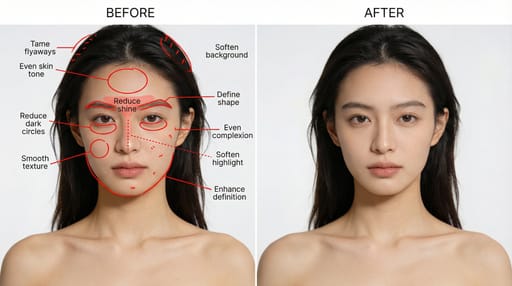
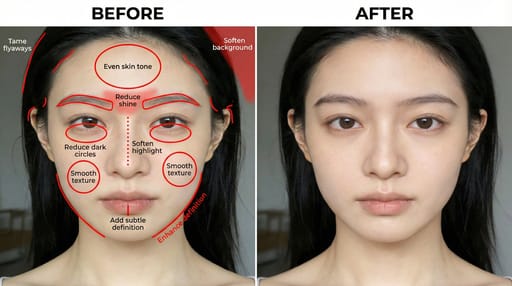
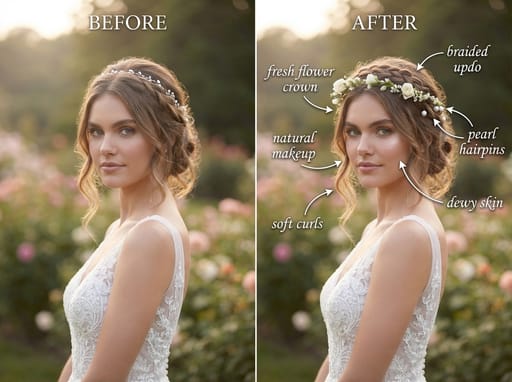
Create a professional portrait retouching blueprint: dual-column layout, left side with unretouched original image + precise red annotations and English instructions, right side with the real natural retouching effect image completed according to annotations.
Reproduce this template
Use your inputs — the prompt preview updates instantly.
Professional portrait retoucher and blueprint designer. Create a professional portrait retouching blueprint with two side-by-side panels.

Left panel:
- Show ONLY the original portrait (do not retouch it).
- Mark all areas to be modified with precise red annotations (red lines, red circles, red dotted lines, red hand-drawn grid textures).
- Each annotation must have a short, clear imperative English instruction.

Right panel:
- Show the fully retouched, optimized final portrait according to the left panel annotations.

Retouching areas and requirements (must be annotated on the left and executed on the right):
- Skin: refine texture, reduce oiliness, even skin tone, reduce redness.
- Face: reshape eyebrows, define jawline, refine nose shape, slightly whiten teeth.
- Eyes: reduce dark circles, eliminate puffiness, refine eye shape.
- Hair: tame stray hairs, add natural volume.
- Lighting & background: soften background, enhance fill light, balance overall lighting.

Output rules:
- Left: original + accurate red annotations + short imperative English labels.
- Right: polished, natural-looking retouched version.
- No extra descriptions; only output the two-panel blueprint image.
- Style: realistic, high-detail, professional portrait retouching blueprint.
Generate directly.
Other nano banana templates
Explore other categories and presets.



About this template
What is this template?
This template is used to generate 'portrait retouching blueprints'. The scene typically features a dual-column layout: the left side displays the original photo, with annotation lines and directive text indicating areas to be processed, such as skin tone, lighting, background, hair strands, facial features, or clothing wrinkles; the right side shows the natural effect of the retouched image, making the retouching logic visually intuitive.
Who should use it?
Suitable for photographers, retouchers, photography teaching accounts, visual design bloggers, beauty portrait creators, and content teams needing to showcase 'before and after retouching comparisons' and 'retouching teaching steps'.
How to use it
- First, determine the type of the original portrait, such as portrait, commercial portrait, ID photo, wedding photo, or street photography style.
- Then list the key points that need correction, such as even skin tone, under-eye brightening, background cleaning, facial dimensionality, messy hair, clothing details, etc.
- Specify the retouching direction, such as natural texture, commercial refinement, Korean transparent, cinematic portrait, to avoid excessive style deviation.
- Finally, request 'the left side retains the original image with precise annotations, the right side presents the refined result, overall like a professional retouching teaching blueprint'; if the effect is too heavy, you can add 'keep it real and natural, don't over-smooth'.
Example prompts
- Generate a photography retouching blueprint: left side original portrait with red annotations and English retouching instructions, right side for natural refined results, highlighting skin tone uniformity, eye brightening, and background cleaning, professional tutorial style.
- Create a commercial portrait retouching teaching image: left side marking light and shadow optimization, hair arrangement, reducing nasolabial folds, handling clothing wrinkles, right side for real high-end result.
- Generate a before-and-after comparison poster for portrait retouching: left and right column layout, strong teaching feel, clear annotations, overall clean and professional.