
AI pet portrait generator
Turn a photo of your cat or dog into a studio portrait, painted keepsake or royal-style portrait. Choose a style and review your pet’s distinctive markings in the result.
A real tool run with a synthetic reference
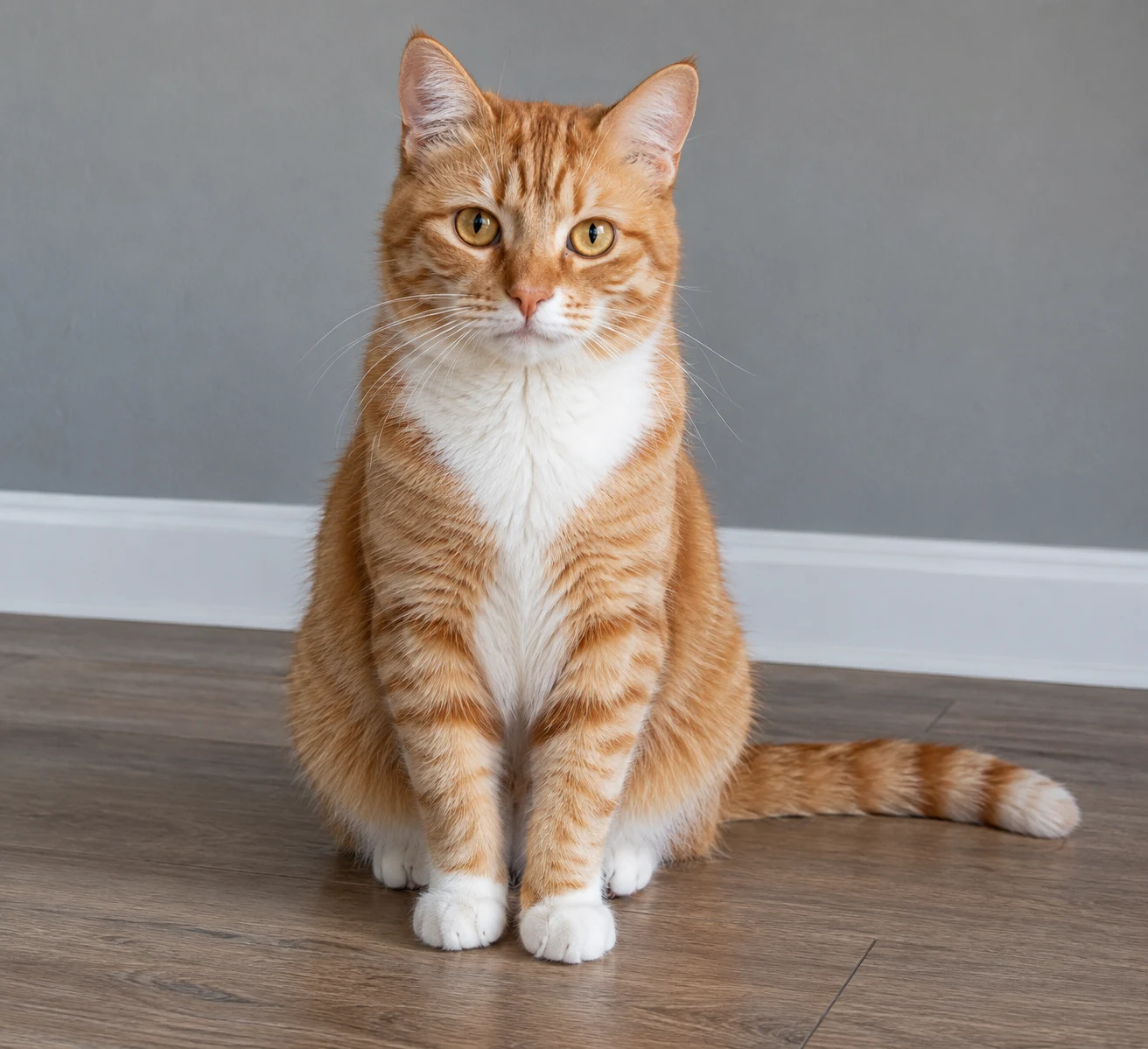
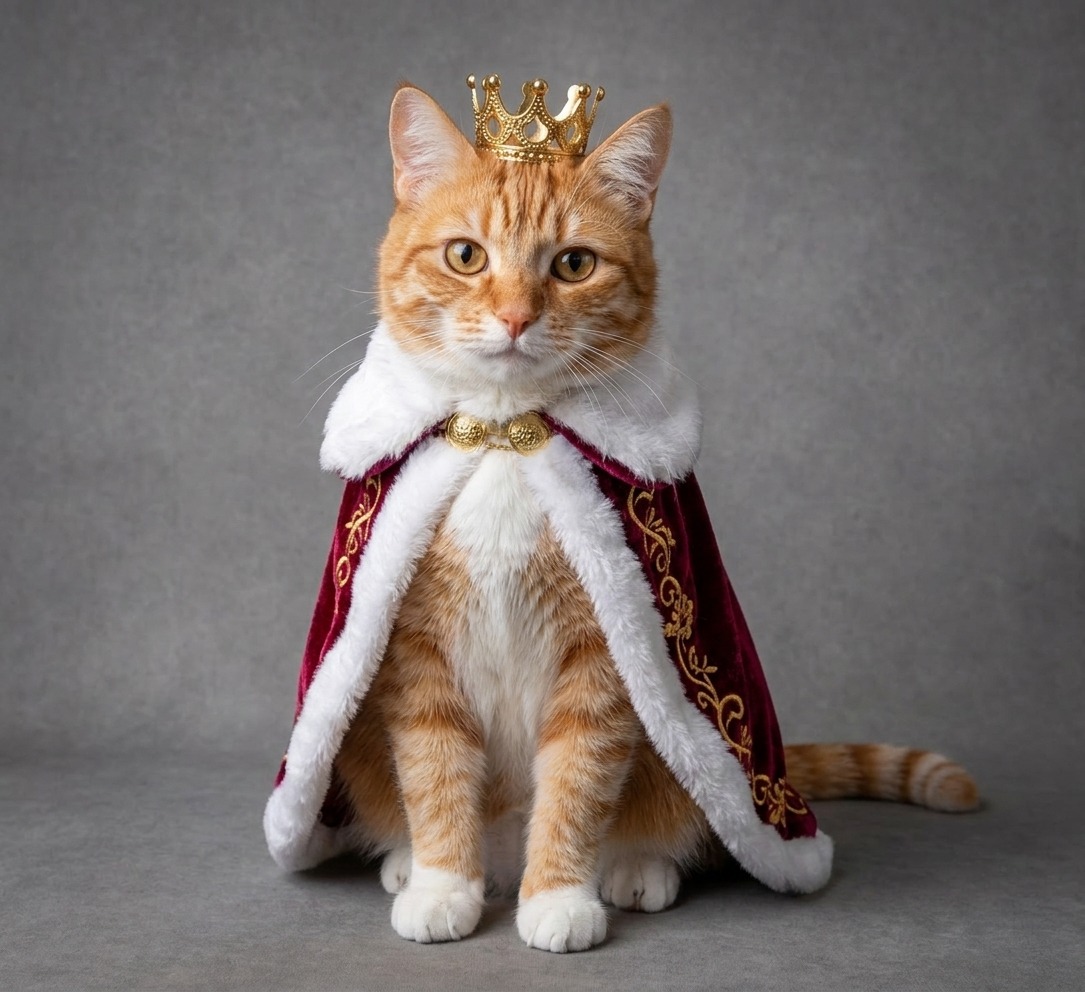
Production test, October 25, 2026: a synthetic orange-tabby reference was uploaded with Studio pet portrait selected. The result kept the broad orange-and-white colouring but added an unrequested crown and cape. This is a documented style mismatch, not an approved Studio result. Compare coat markings and accessories carefully. Generation and download succeeded; the ledger recorded 5 credits. This is not a customer delivery.
Upload one JPEG, PNG or WebP showing one cat or dog clearly, including the face and distinctive coat markings.
Prompt preview
Create one portrait of the single cat or dog in the attached reference photo. Preserve its recognizable coat pattern, colouring, eye colour, ear shape, muzzle, proportions and distinctive markings. Style: Studio pet portrait. Requested details: Keep the coat markings clear, simple background. Keep natural animal anatomy and a comfortable pose. Match only the selected style. For Studio pet portrait, use a simple photographic studio background and no costume, crown, cape or accessories. For Painted pet portrait, use a painted treatment and no costume, crown or cape. Only when the selected style is Royal pet portrait may you add royal clothing; never replace or humanize the face. Output one image, not a collage, comparison, text or logo. Do not introduce another animal.
Upload your image on the left to generate.
Fill the parameters and Generate, or pick an output format — results appear here and save to your workspace.
Need a custom collection?
Share the number of images, your reference style and deadline. We will review the scope before quoting.
Create a portrait from your photo
- Start with your own reference photo, then choose a style.
- Use the brief to describe the details you want to keep.
- Image generation uses 5 credits per completed image. Sign in to generate.
- AI may change markings, eye colour or anatomy. Compare the result with your source photo before using it. This produces a still image, not a talking or dancing video.
Questions before you generate
What should I upload?
Upload one JPEG, PNG or WebP showing one cat or dog clearly, including the face and distinctive coat markings.
Will the result look exactly like my photo?
AI may change markings, eye colour or anatomy. Compare the result with your source photo before using it. This produces a still image, not a talking or dancing video.
How much does it cost?
Generation uses 5 credits per completed image. The workbench shows your generation cost; removing a watermark is a separate optional purchase shown with the result.
Can I choose a different style?
Choose a style in the workbench and describe the setting or details in your brief. Each new generation is a separate image.
Are these examples from this tool?
Yes. The input is a synthetic ImageGen reference, not a customer photo. The output was generated through this tool on October 25, 2026. It is one test, not a benchmark or a guarantee of identity, detail or style preservation. Read the caption for observed limitations.
Does this make a video?
No. This page generates a still portrait. Video animation is a different workflow.
Can I create both cat and dog portraits?
Upload one photo of one cat or dog. Choose a studio, painted or royal-style portrait and describe distinctive features such as a white chest patch or different-coloured eyes. Compare those details after generation.
What makes a useful pet reference photo?
Choose a sharp image with the eyes, ears and coat markings visible. Avoid a distant subject, motion blur or several animals in one frame. Use a wider photo if the body or tail matters; features outside the source crop have to be invented.
Can I request a custom pet portrait collection?
Use the custom collection form to share your image count, styles and deadline. We review the scope before quoting. The self-service generator makes one still image per generation; it does not create a memorial, talking or dancing video.
A new portrait inspired by your reference
Turn a photo of your cat or dog into a studio portrait, painted keepsake or royal-style portrait. Choose a style and review your pet’s distinctive markings in the result.
AI may change markings, eye colour or anatomy. Compare the result with your source photo before using it. This produces a still image, not a talking or dancing video.
Use the result as a creative concept. Review it before sharing or ordering any physical print.
How to create your portrait
Upload a clear reference image.
Choose a style and describe your preferred finish.
Generate and compare important details with your source.
Download the result you want to keep.
For a coordinated collection, use the custom collection form to discuss scope and a quote.
Ways to use your portrait
Personal keepsakes →
Explore a new style from your own reference photo.
Creative exploration →
Compare settings, lighting and portrait styles.
Custom collections →
Discuss a coordinated collection and agree on the scope before production.
関連ツール
スタイル転写
Pixar・ジブリなどのアートスタイルへの変換 — 近日公開
キャラクター → 表情スタンプシート
キャラクターの絵を1枚アップロードするだけで、30秒で9ポーズの表情差分シートが完成。同じ顔で9つの感情:喜び、悲しみ、怒り、愛、泣き、驚きなど——絵文字パック、チャットスタンプ、谷子グッズにそのまま使えます。
AI wedding photo generator
Create AI wedding photos from a photo of you together. Choose a studio, garden or traditional wedding look, then review the generated portrait before downloading.
Add Subtitles

Drag & Drop or Click to Upload
.mp4/.mov/.webm/.avi/.wmv
Supported Languages
Add Subtitles
Require Translation
Auto Detect
Subtitles
Credits Required:0(Available: 0)