
Join Curify to Globalize Your Videos
or
By using Curify, you agree to our
Terms of Service and Privacy Policy
Reproduce this template
Use your inputs — the prompt preview updates instantly.
Theme
📝Please fill in Theme before generating.
Prompt preview
Create an ultra-high-detail isometric pixel-art timeline illustration (3:4, 4K), combining dense detail with symbolism and metaphor. The user has specified [{theme}].

First, reason about {theme} and determine: the theme title in both English and Chinese, the earliest and latest historical periods to cover, a fitting start stage label and end stage label, and 3–5 key evolutionary stages with their symbolic elements and color palette.

Then build an isometric "EVOLUTION MUSEUM OF {theme}" where each gallery zone represents a stage — so spatial progression equals temporal evolution. Use standard isometric perspective (2:1), rich layered depth, and smooth transitions. Assign 3–5 strongly theme-linked symbolic elements per stage. Use stage-differentiated color palettes to suggest time flow. Add bilingual pixel-font titles integrated into the scene: Chinese "[theme in Chinese]演进史" and English "EVOLUTION OF {theme}", plus subtitles showing the start-to-end span in both languages, and key timeline markers. Keep it professional yet visually engaging with interpretive space; suitable for academic analysis and comparative visualization.Other nano banana templates
Explore other categories and presets.
























About this template
What is this template?
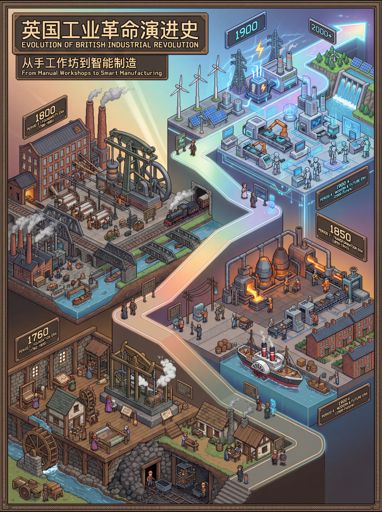
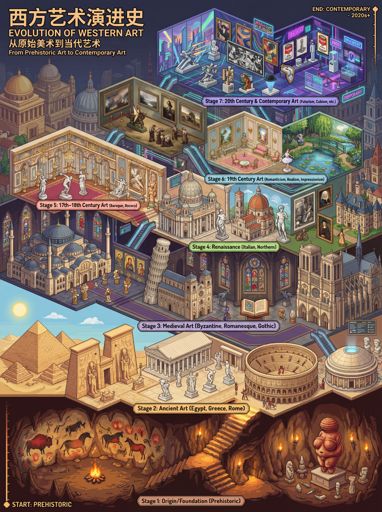
This template uses customized Nano Banana prompts to build an 'isometric pixel museum' timeline: transforming historical stages into navigable exhibition spaces, with each exhibition area corresponding to an era, complete with key node signage.
Who should use it?
Suitable for science popularization/history/technology evolution content, product version iteration displays, educational explanations (classroom/notes), comparative timelines in research reports, and creators who want to make 'development history' more visually appealing.
How to use it
- Define the theme and time range (e.g., 'Human Evolution', 'Mobile Phone Form Evolution', 'AI Model Iteration').
- List 6–10 stages: give 1 core change + 1 landmark (icon/object/symbol) for each stage.
- Request equidistant pixel exhibition: spatial progression, display board numbering, stage titles (can be bilingual), and add small legends/scale bars.
- Check after generation: Are the stages in chronological order; if not, request 'keep the visual style unchanged, rearrange the display boards and nodes'.
Example prompts
- Generate a 'Human Evolution Museum' pixel equidistant timeline: Homo habilis → Homo erectus → Heidelbergensis → Neanderthal → Homo sapiens, including iconic tools/features and key node signage for each stage, bilingual subtitles, 3:4 portrait.
- Create a 'Mobile Phone Form Evolution Museum': feature phone → flip phone → touchscreen → full-screen → foldable screen → AR glasses (concept), one representative model/feature icon for each stage, equidistant pixel exhibition, 3:4.
- Generate a 'Web Development Framework Evolution' pixel museum: jQuery → Backbone → Angular → React → Next.js → RSC (concept), one key idea per stage + icon, clear node markings, 3:4.