스토리보드에서 AI 파이프라인까지 - 애니메이션 재정의

대부분의 사람들은 AI 비디오가 "텍스트 입력, 클립아웃"을 의미한다고 생각합니다. 하지만 영화적이고 감독 수준의 제어를 목표로 한다면 완전히 다른 게임이 됩니다.
기존 애니메이션에서는 캐릭터 디자인, 모션 연속성, 타이밍, 장면 전환 등 모든 세부 사항이 중요합니다. 우리의 목표는 AI가 그 수준의 정밀도와 일치하도록 만드는 것입니다.
오늘날 애니메이션은 예술이자 구조화된 오케스트레이션의 과제입니다. 우리는 감독처럼 생각하지만 엔지니어처럼 만듭니다.
이것이 바로 우리가 일회성 생성 대신 제어형 생성 파이프라인을 구축하는 이유입니다. 이러한 파이프라인은 구조와 창의성을 결합합니다.
AI 영상 생성 파이프라인
AI 비디오 생성 파이프라인은 명시적인 입력, 출력 및 구성이 포함된 구조화된 단계를 통해 텍스트 프롬프트를 세련된 비디오로 변환합니다.
이제 AI 파이프라인이 실제로 어떻게 작동하는지 보여주는 간단한 예를 살펴보겠습니다.
1단계: 기본 프롬프트로 시작
한 소녀가 자정 기차역에 서서 바람에 머리카락을 날리고 있습니다.
GPT 또는 로컬 LLM의 도움으로 이를 전역 스타일, 문자 정의 및 장면별 분석이 포함된 구조화된 JSON 개체로 확장합니다.
A young woman standing alone on a midnight train platform, dim lights reflecting off the wet ground, wind blowing her hair, cinematic lighting, anime art style, 4K2단계: 프롬프트를 스토리보드 테이블로 변환
| Scene | Shot | Camera | Visual | Dialogue |
|---|---|---|---|---|
| 1 | Wide | Sway | The girl waits alone at the platform. Wet pavement reflects dim station lights. Wind gently lifts her hair. | (No dialogue – ambient station sounds) |
| 2 | Medium | Push | The camera slowly zooms in on her eyes. A distant light appears — a train approaches. | She whispers, "It's time." |
| 3 | Close-up | Static | Her hand tightens on an old ticket, knuckles white. Her gaze flickers with nerves and resolve. | (No dialogue – deep inhale) |
| 4 | Wide | Handheld | The train screeches in, spraying mist. The doors open with a hiss. | (No dialogue – train arrival and footsteps) |
| 5 | Over-the-shoulder | Track | From behind, she steps inside. Her silhouette framed by the train's pale light. | She says softly, "I hope you're there." |
| 6 | Inside train | Swivel | She sits beside an empty seat, the world passing in blurred streaks outside. | (No dialogue – distant announcement echoes) |
| 7 | Insert | Static | Close-up of her phone: a message reads "I'm waiting." Her lips form a faint smile. | |
| 8 | Medium | Dolly | The train slows. She stands and approaches the door, breath catching in anticipation. | (No dialogue – heartbeat and brakes squeal softly) |
🛠️ 🛠️ 3단계: 비주얼 생성
ComfyUI 워크플로를 통해 Stable Diffusion을(를) 사용하여 각 샷에 대해 고품질 키프레임 이미지를 생성하세요.
🎬 🎬 4단계: After Effects에 모션 및 분위기 추가
Adobe After Effects(또는 이에 상응하는 합성기)을 사용하여 모션, 시차 및 대기로 정적 키프레임을 향상합니다.
🎧 🎧 5단계: 음성 및 자막 추가
접근성과 명확성을 위해 스토리보드에 맞춰 음성 해설을 생성하고 자막을 첨부하세요.
📦 6단계: FFMPEG을 사용한 최종 구성
FFMPEG을(를) 사용하여 모든 부분을 오디오와 자막이 포함된 하나의 최종 비디오 파일로 결합하세요.
ffmpeg -f concat -safe 0 -i mylist.txt -c copy output_temp.mp4

ffmpeg -i output_temp.mp4 -i music.mp3 -filter_complex "[0:a][1:a]amix=inputs=2" output_final.mp4
# -filter_complex: Apply audio filter to mix both audio tracks
# [0:a][1:a]amix=inputs=2: Mix both audio streams (from video and music)
# output_final.mp4: Final output file with video and mixed audio
📁 필요한 것
- storyboard.json – short scene descriptions
{ "project_name": "Midnight Train", "scenes": [ { "scene_number": 1, "shot_type": "Wide", "camera_movement": "Sway", "description": "Girl waits alone at a midnight train platform. Wet pavement reflects dim station lights. Wind gently lifts her hair.", "duration_seconds": 5, "visual_elements": ["night", "train station", "wind effect", "reflections"], "audio_cues": ["ambient station sounds", "distant train"] }, { "scene_number": 2, "shot_type": "Medium", "camera_movement": "Push", "description": "Camera slowly zooms in on her eyes. A distant light appears — a train approaches.", "duration_seconds": 4, "visual_elements": ["close-up", "eyes", "approaching train light"], "audio_cues": ["train approaching", "whisper"] } ], "style": "cinematic anime", "aspect_ratio": "16:9", "fps": 24 } - prompts.json – GPT-expanded prompts
{ "base_prompt": "A girl stands at a midnight train station, wind blowing her hair.", "expanded_prompts": { "scene_1": { "visual_description": "A young woman standing alone on a midnight train platform, dim lights reflecting off the wet ground, wind blowing her hair, cinematic lighting, anime art style, 4K", "camera_instructions": "Wide shot, slight camera sway to create tension, shallow depth of field", "lighting": "Low-key lighting with high contrast, blue hour ambiance, artificial station lights casting long shadows" }, "scene_2": { "visual_description": "Close-up of the woman's eyes, reflecting the approaching train light, detailed eyelashes, subtle eye movement, cinematic anime style", "camera_instructions": "Slow push-in, slight handheld shake for intensity, focus pull from eyes to reflection", "lighting": "Chiaroscuro lighting, single key light source from the approaching train" } }, "style_guide": { "color_palette": ["#0a1a2f", "#1a3a5f", "#4a90e2", "#f5f5f5"], "mood": "Mysterious, anticipatory, cinematic", "art_references": ["Makoto Shinkai's night scenes", "Ghost in the Shell lighting"] } } - scene1.png, scene2.png – image outputs
- scene1.wav – voice narration per scene
- build_project.jsx – AE import + animation script
- combine_video.sh – FFMPEG merge script
Take the next step
Putting what you read into practice.
관련 기사
Creator Tools
Best AI Tools for Video Content Creators in 2026: Descript vs ElevenLabs vs Runway
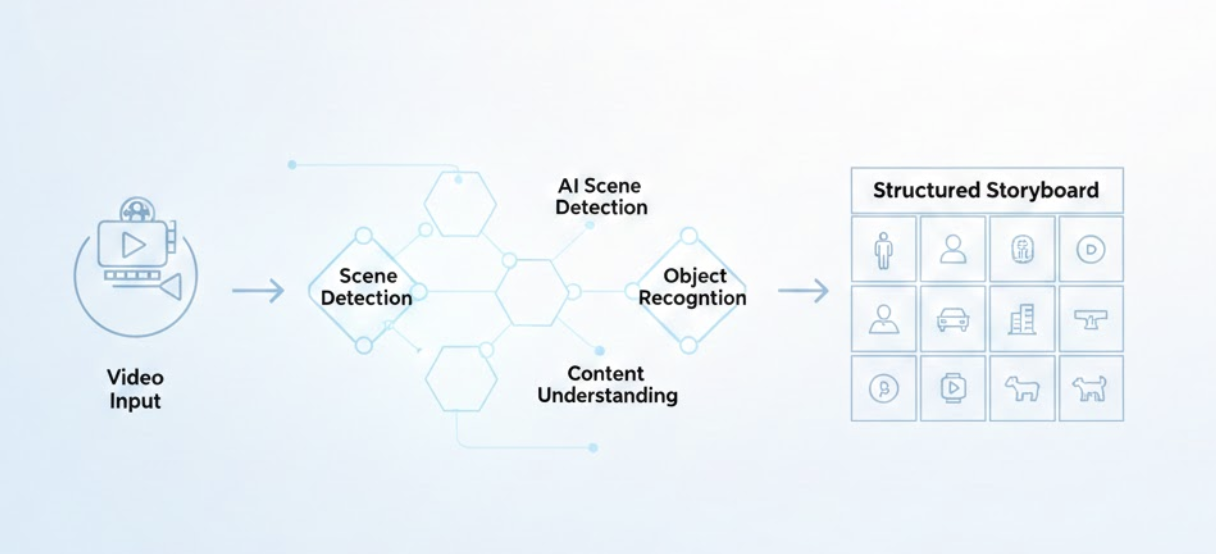
From Raw Footage to Storyboards: AI-Powered Video Analysis