Flashcards for Kids: AI Bilingual Vocabulary Templates for Ages 2-5
Flashcards for Kids: AI Bilingual Vocabulary Templates for Ages 2-5
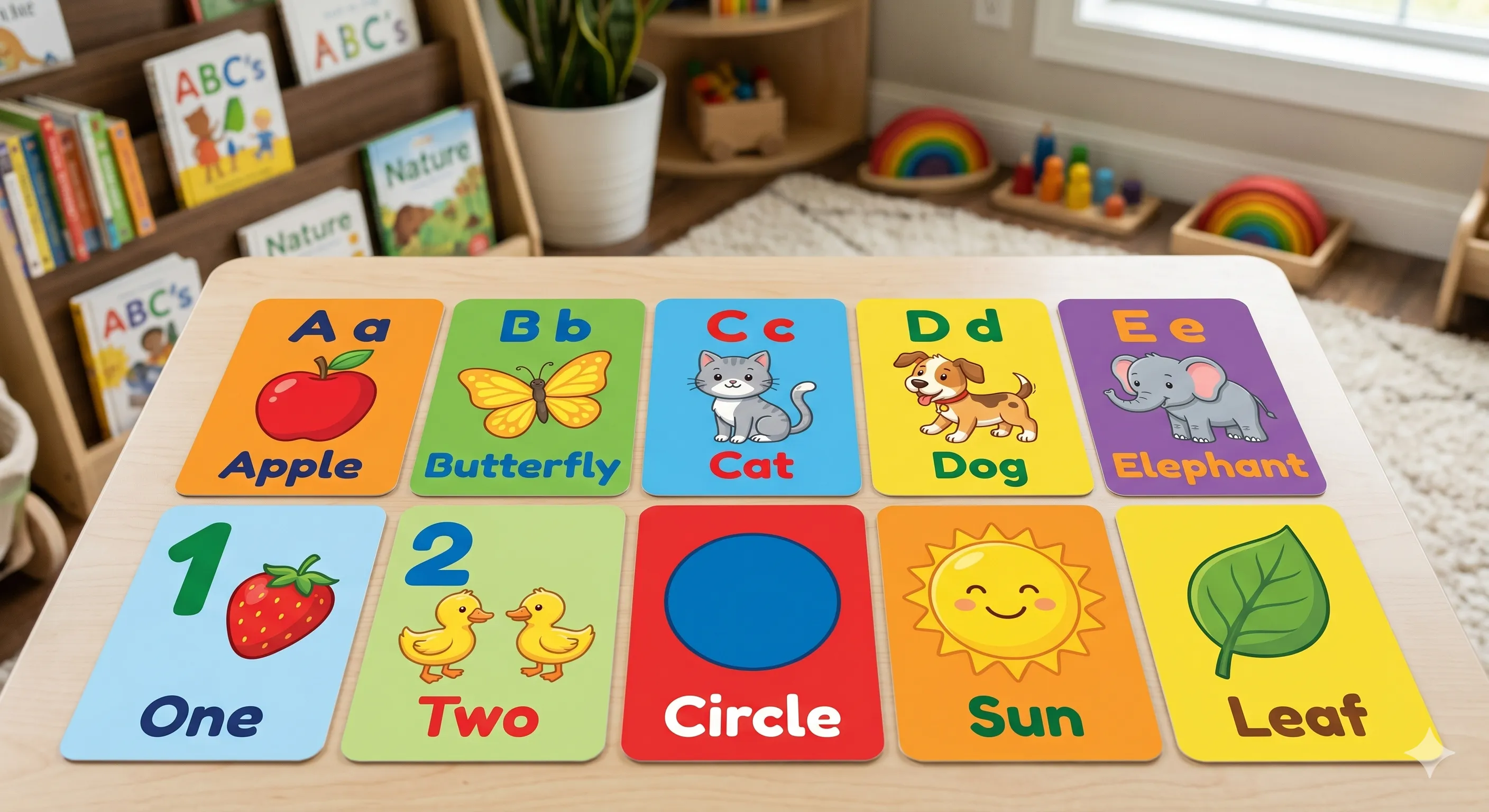
Toddlers learn vocabulary fastest when a new word arrives with a memorable picture, in a moment of joint attention. The bilingual flashcard format — image plus the word in two languages on the same card — works because it removes the translation step from the child's brain. This guide is the practical version: which topics actually retain at ages 2-5, the Nano Banana templates that produce consistent card families across a whole topic, and the prompt patterns that fail with toddler audiences (and why).
🎯What Are Bilingual AI Flashcards?
A bilingual flashcard for early childhood is a single image-and-word card where one visual is paired with the same noun in two languages — typically the household language and the target language. The child sees the picture, hears both words, and the association forms without an English-as-intermediary step. The AI version of this format does two things faster than DIY: it produces consistent illustration across a topic family (every animal in the same style, every fruit at the same shoulder height) and it generates a full topic set in one batch rather than one card at a time. The win is not faster cards — it is cards that look like they belong together, which matters more to a 3-year-old than to an adult. Three decisions determine whether a card lands: **Image clarity at thumbnail size**: A toddler holding a phone reads a card at 4 cm wide. If the subject is busy, the card is just colour. Test every card by shrinking it. **Word placement that does not compete with the image**: Word top, image center, second-language word bottom. The child's eye should land on the image first and the words second. **Single subject per card**: Two animals on one card teaches "animals" not "cat" or "dog". Children under five generalize; the card has to be a singleton.
🌟Why Bilingual Cards Beat Translation-First Apps
Apps that show a word and ask for translation set up the wrong loop — the child learns to translate, not to think in the target language. Image-first cards skip the loop. **Joint-attention moment**: A printed card a parent holds beats a screen because the child looks at the adult's face, the image, and the adult's mouth in sequence. The screen interrupts this. Generate cards that print well at 7x10 cm. **Repetition without rote**: A topic family (12 animals, 16 foods) lets the parent vary the order, mix in known cards as confidence boosts, and add new cards as the child masters earlier ones. Apps that linearize this kill the natural spaced-repetition the child already does on their own. **Vocabulary that matches the child's life**: A flashcard set for a kid in a city has subway, dumplings, and pigeons. A set for a kid in a rural area has tractor, hay, and chickens. The win is custom topics, not premade decks — that is where AI generation actually outperforms shelf products.
🚀Five-Step Flashcard Workflow
Step 1: Pick a Topic the Child Already Uses
Vocabulary retention at ages 2-5 is anchored to lived experience. Best first topics: family members, food (specifically what the child eats this week), pets and immediate-environment animals, body parts, clothing, weather words. Avoid abstract categories ("emotions", "transport") at this age — they retain better as the child matures past 4. Topic size: 8-16 cards per set. Smaller sets are easier to rotate; larger sets overwhelm. A topic should fit in a small box the child can carry.
Step 2: Generate Card Families With One Template
Use the Nano Banana flashcard template (or a custom Curify template for your set) and generate the full topic in one batch. The point of using a template — versus prompting each card individually — is consistency: every animal in the same illustration style, the same background tone, the same proportion of subject to whitespace. A strong template prompt fixes the art direction once: "soft cel-shaded illustration, white background, single subject centered, no text overlays, even lighting". The card-to-card variable is just the noun.
Step 3: Add Bilingual Word Placement
Words go on after image generation, not in the prompt. AI-rendered text in Nano Banana is unreliable at the small sizes flashcards demand, and the typography choices a child needs (high-contrast sans-serif, generous letter-spacing) are easier to control in a layout tool. Layout pattern that works: target-language word on top in larger weight, image in the center taking 60% of the card area, household-language word on the bottom in a smaller, lighter weight. The hierarchy signals which language is the goal without saying so.
Step 4: Add Pronunciation Audio (Optional but Recommended)
For languages where the parent is not a native speaker, attach an audio file per card via QR code on the back. Free TTS from any major cloud provider sounds natural enough for single-word pronunciation at toddler age — Azure Neural, Google Cloud TTS, and ElevenLabs all work. Avoid robotic-sounding free voices; the child mimics what they hear. For parents who are native speakers in the target language: record yourself, not the TTS. The child recognizes your voice and engages more.
Step 5: Print, Test, Iterate
Print on cardstock at 7x10 cm or 10x15 cm. Smaller is more portable; larger is easier for under-twos to handle. Test the set with the child for two weeks. Cards that consistently fail to retain are usually: — Visually similar to another card in the set (the giraffe and the deer look the same) — Subject too small in the frame (zoom in) — Vocabulary the child does not actually encounter in daily life (replace it) Replace failing cards, regenerate from the same template so consistency stays intact, and re-print just the changes.
📋Three Ready-To-Use Template Prompts
Each prompt is a starting point — adjust the topic noun and the art direction to your child's preferences. All three are designed for the Nano Banana flashcard template family.
Animals Topic (12 cards)
Food Topic (8 cards)
Body Parts Topic (10 cards)
💎What This Format Does That Apps Do Not
**Custom vocabulary**: An app gives the child the deck the app decided to make. A generated set gives the child the deck of *their* life — their family's specific food, their stuffed animals by name, the local fauna they actually see. **Parent-driven pace**: The parent decides when to add new cards, when to retire mastered ones, when to mix sets. Apps decide for you, often badly. **Print durability**: Cardstock cards survive a toddler's morning. Tablets do not. **Cost**: One template generation produces 12-16 cards for the cost of a few image credits. Premade bilingual sets cost $20-40 each.
🛠️Companion Tools Worth Knowing
**Anki / Quizlet (for older children, 5+)**: Spaced-repetition apps if the child has progressed past the print stage. Import your generated cards as image-and-text pairs. For ages 2-4, print still wins. **Canva, Figma, Affinity Publisher**: Layout the bilingual words on the AI-generated images. Canva's free tier handles a 16-card set easily. Avoid Word/Pages — type kerning is awful at card size. **Azure Neural TTS / ElevenLabs**: Pronunciation audio for parents who are not native speakers in the target language. ElevenLabs has the most natural single-word delivery; Azure is the cheapest at volume. **Curify Nano Banana flashcard template**: The production template for full-topic batches with consistent art direction. The point is the consistency, not the speed.
⭐Common Mistakes To Avoid
**Cluttered illustrations**: AI tends to add background details (clouds, grass, a small bird). For ages 2-3, strip these out. The subject is the card. **Cute over clear**: A stylized fox with five tails is adorable but does not teach "fox". Default to recognizable-first, cute-second. **Inconsistent set art direction**: Mixing photoreal with cel-shaded mid-set breaks the family feel. Regenerate any card that drifted. **Single character recurring**: Avoid putting the same cartoon child in every card — the child generalizes "that's the boy from the cards" instead of learning the nouns. Use objects/animals as subjects; people only when the topic is people. **Skipping the household language**: Always include both languages on the card even if the child seems to know the household-language word. The pair is the point.
🎉Build the First Topic, Then Stop
The biggest mistake is generating 200 cards before testing one. Start with a single 12-card topic, print it, run it with the child for two weeks, then iterate. The cards the child loves tell you which art direction works for *your* kid; build the next topic around that. Generate, print, iterate — in that order. The AI does the production work; the parent still does the teaching.
One image is a sample. A product line needs the whole set.
Every Curify template runs in bulk. Send the list — SKUs, words, characters, teams, scenes — and we return the full set generated against one locked visual direction, so the line reads as a collection instead of forty unrelated images.
- Works on any template, not a special few — the same prompt structure applied across your whole list.
- One locked visual direction across the set, so a 40-design line stays on-brand end to end.
- Production-ready output where the format calls for it — die-cut paths, dielines, print resolution.
Take the next step
Putting what you read into practice.
Browse related topics
More templates and prompts in these areas.
Related Articles
Learning & Education
Visual Learning: AI Tools, Flashcards, and Infographics for Modern Classrooms
How to Create Viral Learning Content (Flashcards, Dialogue Scenes, Visual Knowledge)